
Blox Fruits Storage and Trading: Physical vs Permanent Fruits
To keep a fruit, store the physical fruit with Store; to trade it, offer it in the official trade window while it remains stored. Eat and Money purchases from the Dealer change your current ability. Distinguishing storage, equipped abilities, and permanent access helps prevent accidental eating and trade mix-ups.
What kind of game is Blox Fruits?

Blox Fruits is a Roblox action RPG where you explore the seas and fight using fruit abilities. Eating, storing, and trading a fruit have different results. Distinguishing your current ability, unused physical fruits, and permanent access is the first step toward avoiding accidental eating or trade mistakes.
MetaNew Player Survey

The next survey is being prepared.
4 fruit states to distinguish first
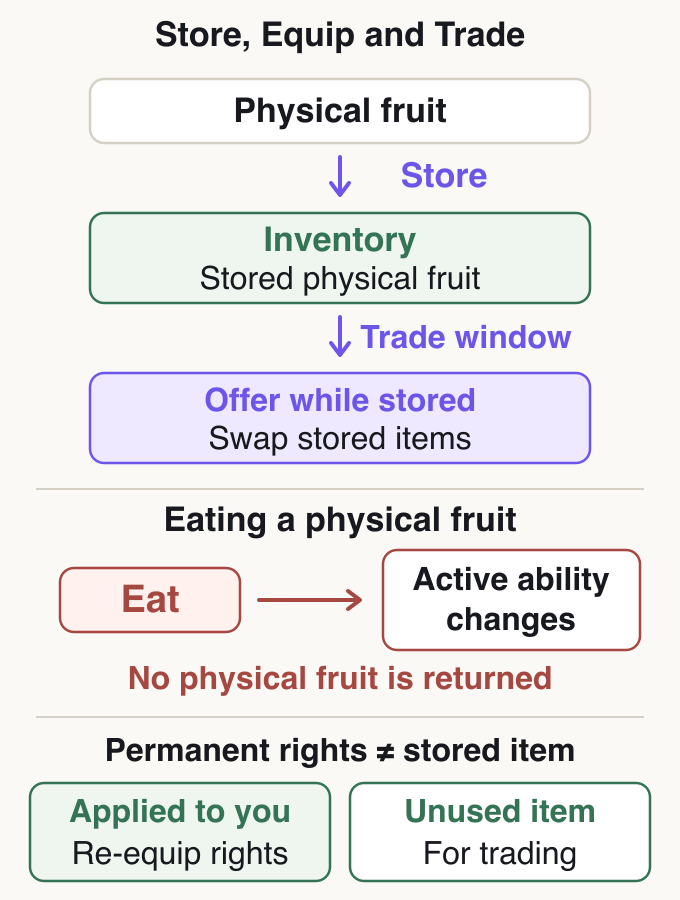
Having Light can mean using its ability after eating it or keeping an unused fruit in storage. Those states allow different actions. Decide your goal first: store a found fruit as a physical item for later, or eat it to change your ability now.
Even with the same fruit name, handing someone an equipped ability is not the same as trading a physical fruit in Inventory. Permanent fruits also differ between access you can use to re-equip and unused items stored for trading.
Differences between storage, equipped abilities, and permanent access
| State | What you own | Available next actions |
|---|---|---|
| Unused physical fruit | A fruit found or obtained through Gacha or another source | Eat it, store it, or store it for trading |
| Equipped fruit ability | The fruit ability you currently use | Use unlocked moves. This is different from converting it back to a physical fruit for trade |
| Permanent fruit for your own use | The right to re-equip the same ability | Re-equip that fruit after changing to another ability |
| Unused permanent fruit for trading | An item stored in Inventory for gifting or trading | Offer it in an eligible trade; distinguish it from access already applied to your account |
How to store a physical fruit
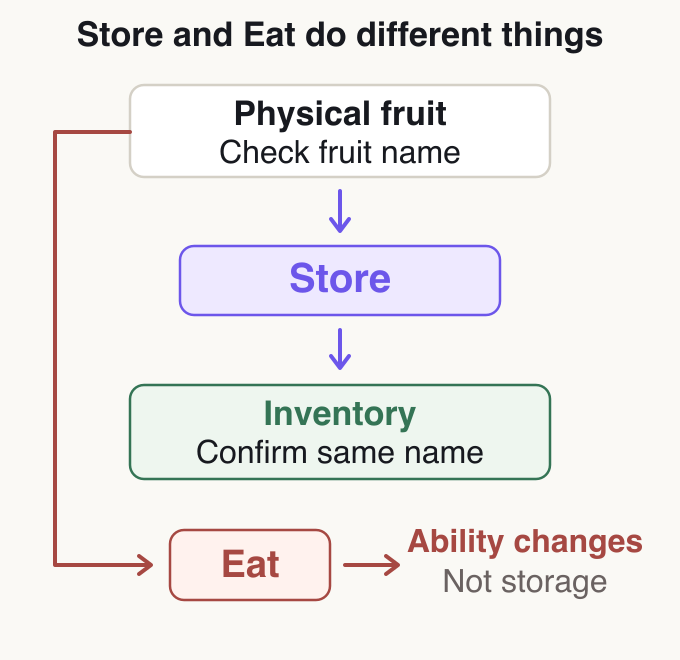
If you do not want to use a newly obtained physical fruit now, select the fruit and store it with Store. Eat replaces your current ability, so do not select it when you intend to save the fruit.
After storing it, find its name in Inventory. Simply holding a fruit or using its ability does not mean you have stored a tradable fruit. Think of this as managing storage in Inventory, rather than searching for the old Treasure Inventory chest NPC.
If storage fails, check the limit for that fruit type
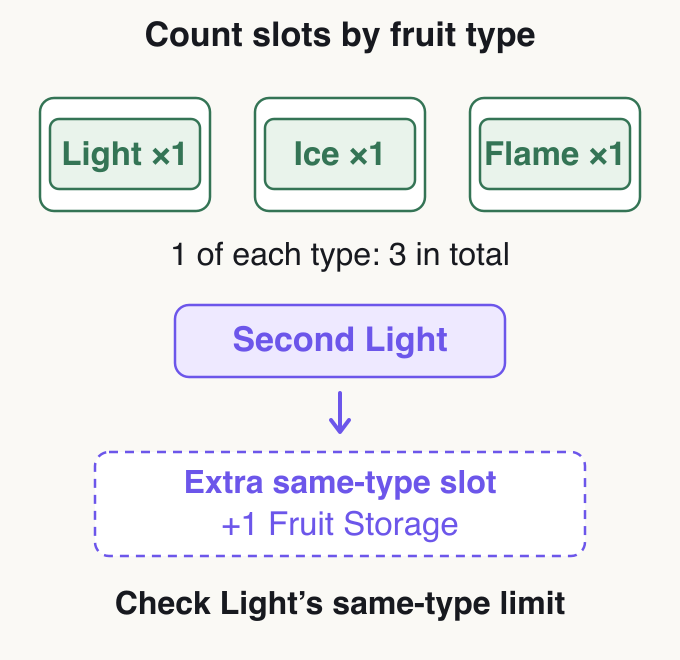
The default limit is not ‘1 fruit in total’; the basic limit is 1 of each type. With 1 Light stored, storing 1 Ice of a different type is different from adding a 2nd Light. Extra capacity for the same type is covered by +1 Fruit Storage.
For example, storing 1 each of Light, Ice, and Flame in the default slots gives 3 fruits because the types differ. Adding a 2nd Light makes the total 4, but the important issue is having 2 Light fruits. Do not withdraw or eat unrelated fruits because you misidentify why storage failed.
Counting fruits of the same and different types
| Storage situation | What to distinguish | Next check |
|---|---|---|
| Storing Ice when 1 Light is already stored | Capacity for a different type | Check how much Ice is stored |
| Adding another Light when 1 Light is stored | Extra capacity for the same type | Check the Light count and extra storage capacity |
| No fruit appears after paying Money at the Dealer | Ability purchase or physical fruit | Check your equipped ability; distinguish this from adding an item to storage |
| You want to store a fruit you have eaten | Ability versus unused item | Do not treat it as converting an equipped ability back into its original physical fruit |
Withdraw only after deciding what to do with the fruit
| Purpose | Decision before withdrawing |
|---|---|
| If you intend to eat it | Withdraw only after understanding that your current ability will be replaced |
| If you intend to give it to an NPC | Read the required fruit type and conditions first |
| If trading with another player | Offer it at the trading seats while it remains stored |
| If you only want it for later | Avoid withdrawing without a purpose |
Keep fruits stored until you need them
If you withdraw a physical fruit from Inventory and die while carrying it, you lose that fruit. Do not withdraw an expensive fruit just to show it or carry it to hand over before a trade. Withdraw immediately before a necessary action, such as eating it or giving it to the relevant NPC.
Separating stored and equipped states makes the choice clearer. To keep your current ability, store the new fruit rather than eating it. To trade, keep it stored and use the official trade window. Do not assume stored fruits must be dropped on the ground to hand them over.
Dealer purchases versus permanent fruits
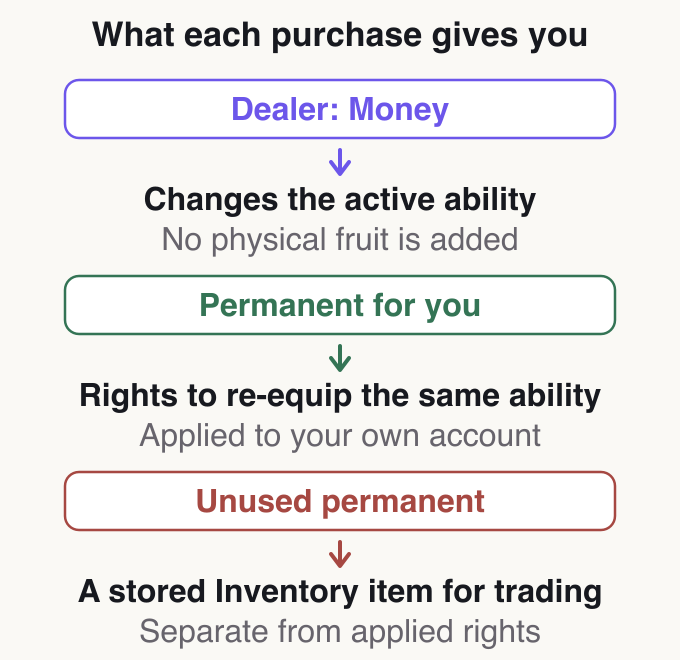
Paying Money at the Blox Fruit Dealer switches your equipped ability to the fruit in stock. It does not add 1 physical fruit to storage for trading. To preserve your current ability, read the replacement fruit’s name before confirming the purchase.
Permanent fruits let you re-equip the ability after using another fruit. However, access already applied to your own account differs from an unused item stored in Inventory for gifting or trading. When buying for a trade, distinguish who receives access from whether an item is being stored.
For example, if you use Light and want to keep a physical Ice for later, store Ice. Paying Money to switch to Ice’s ability does not accomplish the same goal. Compare names and normal or permanent prices in the fruit list ordered by price.
What Dealer and permanent-fruit purchases give you
| Purpose | Method to compare | Common mistake |
|---|---|---|
| Change your current ability to another fruit | Buy with Money at the Dealer or eat a physical fruit | Assume a physical fruit is added while your current ability stays unchanged |
| Keep a fruit for later without using it now | Store the physical fruit you obtained | Choose Eat when intending to save |
| Return repeatedly to the same ability | Consider permanent access for your own use | Assume access already used can later be traded to another player |
| Trade an unused item with someone | Stored physical fruits or permanent fruits stored for trading | Apply it to yourself and then try to turn it back into a trade item |
Where and how to trade fruits
| Order | Actions at the trading seats |
|---|---|
| 1 | Go to the location: use the trading seats at Café in the Second Sea or Mansion in the Third Sea |
| 2 | Sit opposite each other: open the trade window with the other player |
| 3 | Select stored items: verify the name and state of what you offer |
| 4 | Read the other offer: compare fruit names, quantities, and physical or permanent status |
| 5 | Read the trade requirements: distinguish price-difference rules from ownership and storage limits |
| 6 | Confirm only the agreed contents: do not rely on later repayment or payments outside the game |
Read offers in the official trading interface
Trading locations are Café in the Second Sea and Mansion in the Third Sea. Sit opposite the other player and offer stored items in the trade window. Handing over a fruit first in the First Sea is not a substitute for this feature.
Compare the offered names, quantities, and whether items are physical or permanent. Do not treat permanent access already applied to yourself, or the ability you currently use, as an unused trade item. If the other player changes the offer, read the updated contents before deciding.
Displayed prices and trading values are different figures
| Purpose / situation | Decision before trading |
|---|---|
| To equip and use | Compare the use case and the cost of replacing your current ability |
| To collect | Compare same-type storage capacity and the fruits you want to keep |
| If the trade will not proceed | Diagnose the cause from the displayed conditions |
| If you do not accept the offer | Decline the trade rather than rushing to confirm |
Separate trading requirements from your purpose
The Money price used in the trade window relates to the game’s completion rules. Player valuations based on demand or scarcity are a different figure. Meeting the price-difference rule does not guarantee fruits with equal usefulness or demand. Do not directly convert the game’s Money price into a private-sale Robux price.
If you want Light for progression, consider not only whether a trade gains a fruit, but whether you can replace your current ability, whether it fits your same-type capacity, and whether you have time to develop the needed moves. For collecting, extra capacity for duplicate fruits also matters.
If a trade cannot proceed, start with the reason shown on screen. A permanent fruit the recipient already owns, a same-type storage limit, price differences, and other trade requirements need different responses. Failure does not require abandoning the official trade for an advance handover.
What changes and what remains after eating the wrong fruit
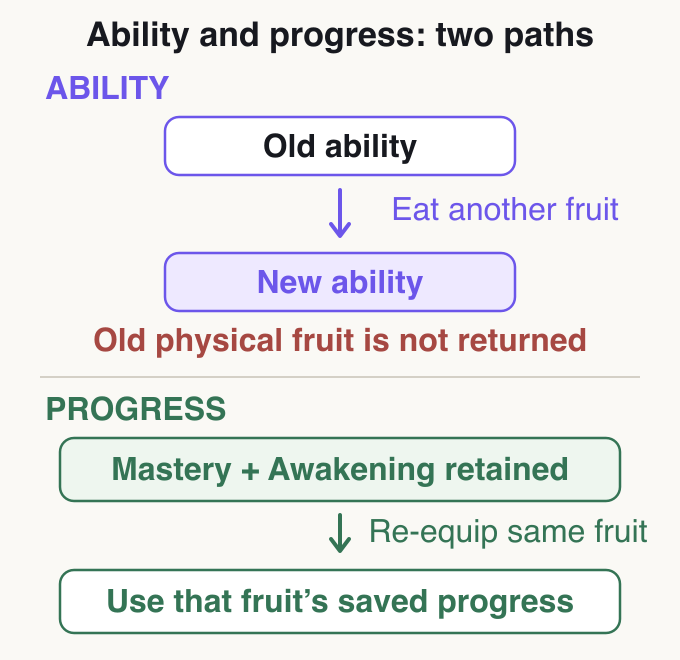
Eating another fruit switches your equipped ability to the new fruit. The previous ability does not return as an unused physical fruit. Without permanent access, you must obtain the same fruit again to use that previous ability.
That does not mean the previous fruit’s Mastery or unlocked awakening progress is erased. You can use that progress when re-equipping the same fruit. Treat changing abilities separately from whether your progression history is lost.
A stat reset reallocates assigned points; it does not restore the physical fruit you had before eating. Read code reward types too, so you know what changes. Detailed redemption and reward explanations are in our guide to using codes.
What changes after eating a fruit or resetting stats
| Action | What changes | What not to confuse it with |
|---|---|---|
| Eat a new physical fruit | Equipped fruit ability | This does not turn the old ability back into a physical item |
| Re-equip the same fruit as before | The ability you use again | This does not mean restarting Mastery or awakening progress |
| Reset stats | Assigned Stats | This does not return the fruit you had before eating |
Frequently asked questions (FAQ)
Can I store fruits in the First Sea?
Store physical fruits in Inventory. Storage differs from player trading locations. Trading seats are at Café in the Second Sea and Mansion in the Third Sea, so do not hand over fruits first in the First Sea as an alternative.
Does the storage limit mean only 1 fruit in total?
The limit is per type. With default capacity, 1 Light and 1 Ice are different types, but storing 2 Light involves extra capacity for the same type. Do not judge by total count alone.
Do I need to withdraw fruits before trading?
Offer stored items in the trade window. There is no need to withdraw and hand them over in advance.
I already use a permanent fruit. Can I trade it?
Permanent access already applied to your account differs from an unused item stored in Inventory for trading. The right to re-equip is not something you convert directly back into a trade item.
Does changing fruit erase Mastery?
Switching the equipped ability and progression are separate. Re-equipping the same fruit lets you use its Mastery and awakened move progress. However, your previous fruit is not returned as a physical item.
Why is a fruit bought with Money from the Dealer missing from Inventory?
A Money purchase switches abilities. Distinguish it from adding 1 tradable physical fruit and check the ability currently equipped.
Summary: Store fruits you want to keep; trade while they remain stored
Decide whether you want to keep, eat, or trade a fruit, then verify its name and storage state before acting.
References
Blox Fruits Wiki
Roblox
Sources checked: October 24, 2026


