
Tactical: Swat Simulator Guide: Getting started from the locker to the mission pad
About
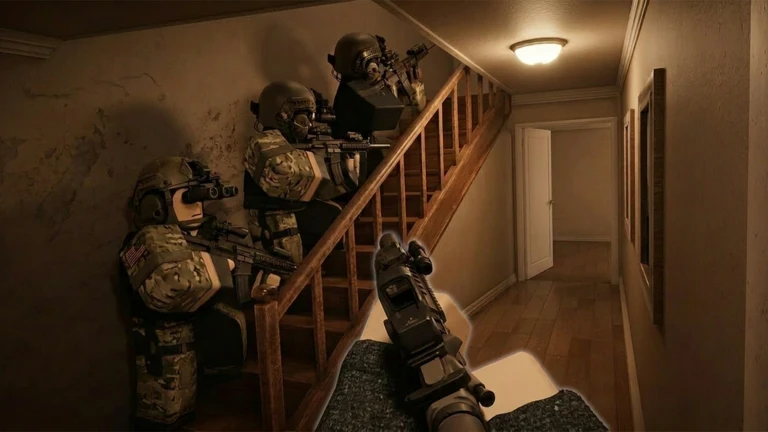
OverviewTactical: Swat Simulator puts you in the boots of an elite SWAT officer responding to bank robberies, prison riots, house raids, and port takeovers. You breach buildings, clear rooms, and take down suspects one operation at a time. This guide covers how to get started, how to fight smart, how to handle objectives beyond combat, and how to make the most of your gear.
What is on this page
Contents
Player notes and tips
Found a useful trick? Share it with everyone! Notes with screenshots are welcome!
Write a guide note
[👮] Tactical: Swat Simulator
Getting started from the locker to the mission pad
Step
When you first join, head straight to the locker area. This is where you choose your weapons and the rest of your gear before any mission begins. Once you are happy with your loadout, walk over to a mission pad and interact with it. The pad shows you the mission name and difficulty, so read both before you commit and start your first operation on normal difficulty.
- Find the locker
pick your weapon and gear here before anything else.
- Set up your gear
sort out armor and tools before you leave the locker area.
- Walk to a mission pad
once your loadout is ready, move to the pad on the map.
- Check the mission name and difficulty
read both before you start.
- Interact with the pad
this is what actually launches the operation.
- Start on normal difficulty
move up only once you can clear the same mission consistently.
MetaNew Player Survey

The next survey is being prepared.
Active tasks and what actually ends a mission
CheckThe active task list on the left side of your screen shows every objective you need to complete — rescuing civilians, securing hostiles, and recovering stolen goods, not just taking down enemies. Even if the building feels clear, the mission will not end while any task remains open. Check the list the moment a mission starts so you know exactly what you are working toward.
- Read the active task list at the start note the type and number of each objective.
- Confirm whether objectives include civilians, evidence, or stolen goods beyond combat.
- After taking down a hostile, walk up and perform the secure or report action the task count will not advance otherwise.
- If a prompt does not appear near an NPC, check the task list to see whether that target is already processed.
- When the building seems clear but the mission has not ended, return to the entrance and check each room in order.
Clearing buildings room by room
Tips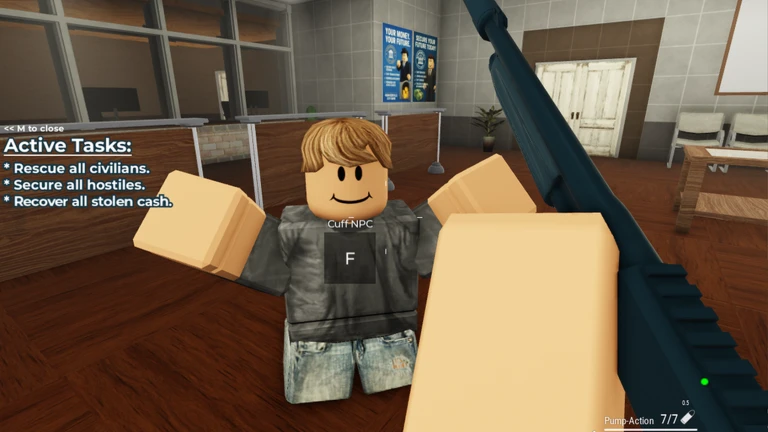
Each mission sends you into a building full of hostile suspects. The safest approach is to treat every room as its own problem — clear it completely before pushing into the next one. Walls and furniture give you cover, so use them rather than standing in the open. Check your remaining ammo before entering each new room and reload in a safe spot rather than mid-fight.
- Scan a room before you step fully into it so you know where suspects are waiting.
- Use walls and furniture as cover rather than walking into the middle of a room.
- Finish every suspect in one room before moving to the next.
- Check your ammo count before each new room and reload while no enemies are visible.
- Keep an eye on your escape route in case you need to fall back.
- In co-op, spread out at doorways instead of crowding the same entrance.
Telling civilians apart from hostiles
WarnNPCs that carry weapons and attack you are hostiles. Before you fire, create some distance and watch whether the NPC moves toward you aggressively. The on-screen prompt that appears when you approach also helps — a secure or rescue label means the target is not someone to shoot.
Weapon and gear choices
Table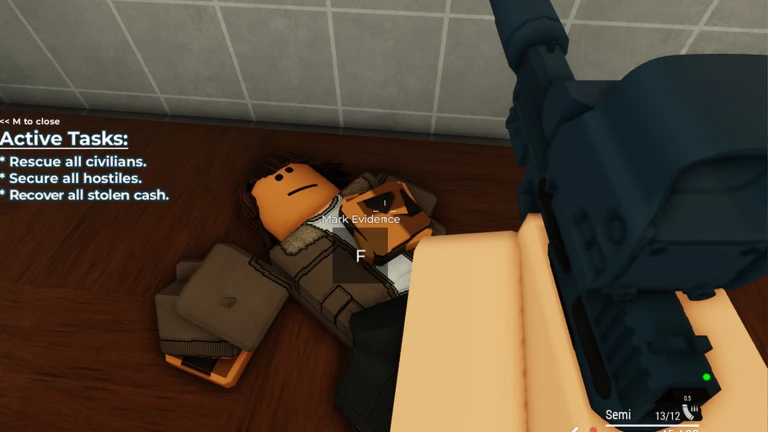
The locker gives you several weapon types, each with different strengths. Your armor choice matters too — heavier armor absorbs more punishment while lighter armor keeps you moving freely. If a piece of equipment is locked, open the shop screen to see what cash, rank, or game pass it requires before you decide whether to work toward it.
| Balanced weapon | good all-round option for new players. |
| High-damage weapon | fewer shots needed, but harder to control. |
| Rapid-fire weapon | strong when suspects are grouped, weaker against single tough targets. |
| Heavy armor | takes more hits before going down, but reduces how quickly you can move. |
| Light armor | keeps movement fast, but you will feel each hit more. |
| Expensive specialist gear | check the shop conditions and decide whether your current missions actually need it. |
Fighting smarter when things go wrong
CheckIf a mission keeps beating you, go back to normal difficulty and practice the same mission with a more forgiving loadout. Focus on completing every task cleanly before you think about raising the difficulty again. Changing your entry route and pulling suspects toward you one at a time are the two most reliable adjustments.
- Confirm your weapon is powerful enough to finish suspects before they close in.
- Check whether your armor choice matches how aggressively you are playing.
- Try entering rooms from a different angle if you keep getting hit from the same side.
- Pull suspects toward you one at a time rather than pushing into a crowd.
- Drop back to normal difficulty if you are going down repeatedly, and prioritize clean task completion over pushing harder.
Free play, codes, and weekly updates
TipsAll the core missions and a solid selection of weapons and gear are available without spending anything. Codes can unlock limited equipment and bonuses — enter them in the in-game code input screen. Each code works once per account. The developers push new missions, weapons, and gear on a weekly basis, so checking the locker after each update is worth the habit. Joining the group and liking the game also gives you in-game currency and XP.
- Free access
all missions and a range of weapons and gear cost nothing to use.
- Code limit
each code can only be redeemed once on a single account.
- Enter codes in the in-game code input screen.
- Group and like bonus
joining the group and liking the game unlocks $350 and 100 XP.
- New missions and gear arrive every week
check the locker after each update.
 SF
HELLO
MUSEUM
POWERPLANT
Glossary
Glossary- Locker
- The area at the start of the game where you pick your weapons and gear before a mission begins.
- Mission pad
- A marked spot on the map that you walk up to and interact with in order to start an operation.
- Mission stand
- The place where you choose the mission type and difficulty before launching an operation.
- Suspect
- An enemy NPC inside a building that you need to take down to complete the mission.
- Gear
- Everything except your weapon — armor and tools that affect how much damage you absorb and how you move.
- Cover
- Walls, furniture, or any object you can hide behind to avoid suspect fire.
- Room clear
- The state of a room once every suspect inside it has been taken down.
- Operation
- A full mission scenario such as a bank robbery response or prison riot, started from a mission pad.
- Active task
- The list of objectives displayed on the left side of your screen during a mission, including combat, civilian, and evidence goals.
- Secure
- The action you perform by approaching a downed hostile or civilian and following the on-screen prompt to count them toward your task total.
- Cash
- The in-game currency used in the shop to unlock weapons and equipment.
- Loadout
- The combination of main weapon, secondary weapon, and supporting gear you bring into a mission.
Common questions
FAQWhat should I do first when I join the game?
Go to the locker, pick a weapon and your gear, then walk to a mission pad. Check the mission name and difficulty shown on the pad, then interact with it to start your first operation on normal difficulty.
Why do I keep getting taken down so quickly?
Check your equipment and how you move around the map. Make sure your weapon is finishing suspects before they reach you and that your armor matches how aggressively you are playing. If you are going down repeatedly, drop back to normal difficulty and practice the same mission until you can clear it cleanly.
How do I avoid shooting civilians by mistake?
Before firing, back off and watch whether the NPC carries a weapon and moves toward you aggressively. When you approach, the on-screen prompt will show a secure or rescue label if the NPC is a civilian. In dark or distant situations, always confirm from a safe position before acting.
Can I use a code more than once?
No — each code can only be redeemed once per account. Once you have used it, that code will not work again on the same account.
Does the game get new content regularly?
New missions, weapons, and gear are added on a weekly basis. Checking the locker after an update is the easiest way to spot what is new.
Game updates can change what is on this page. If you spot something, get in touch and let us know.
