
Чат вернулся Guide: First steps when you join

About
OverviewЧат вернулся (The Chat is Back) is a social roleplay game built around text chat, where you and up to 49 other players pretend to be shopkeepers or customers in a shopping setting. There are no winners or scores — you make your own fun through conversation and roleplay. This guide covers how to get started, how to use the shop and commands, what to do when things go wrong, and how to stay safe while you play.
What is on this page
Contents
First steps when you join
Step
Rushing in with a long message is the most common beginner mistake. Take half a minute to watch the chat scroll, find the shop area, and spot the buttons on screen. Once you have a feel for the pace, you can pull up the command list and then say hello.
- Watch the room spend about thirty seconds noting how fast the chat moves and where the shop area is.
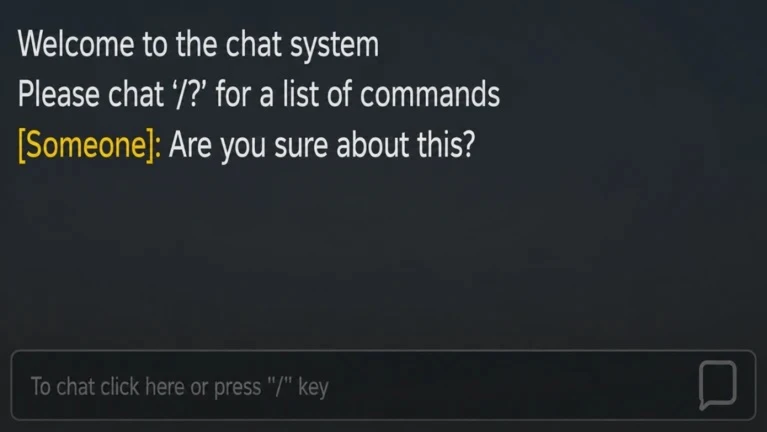
- Open the command list type /? in the chat bar using half-width characters and send it to see every available command.
- Send one short greeting something like "hello" is enough; write one thing per message.
- Wait for a reply do not send the same message again while you wait for a response.
- Check your currency before touching the shop, look at whether prices show coins or Robux.
MetaNew Player Survey
The next survey is being prepared.
Roleplay and the shopping game
TipsThe game centres on playing either a shopkeeper or a customer. Neither role needs any purchase to start. Once you know the commands from the /? list, you can jump into a scene — but a quick word to the other player first goes a long way.
- Ask the other player before starting — a simple "can I join your shop?" opens the conversation naturally.
- Use the commands you found with /? to drive the roleplay forward rather than typing everything by hand.
- If the shop has prices, check whether they cost in-game coins or Robux before you commit.
- Free features and anything you already own are worth exploring before spending anything.
Free play versus paid options
TableThe game is free to join, and basic chat and roleplay work fully without spending Robux. Paid items exist but expand what you can do rather than unlock the main experience. VIP and VIP Commands are two separate products, so buying one does not automatically give you the other — read each description before purchasing.
| Free play | full text chat, roleplay, and shop browsing with no Robux needed. |
| VIP pass | a paid gamepass that adds extra features for players who want them. |
| VIP Commands | a separate paid product that expands command functions; distinct from the VIP pass. |
Fixing common problems
CheckBecause everything in this game runs through chat, knowing how to fix it quickly matters. Work through these checks in order before assuming something is broken.
- Chat bar missing try the speech-bubble button, the input bar at the bottom of the screen, or the / key on a keyboard.
- Message not sending check whether a cooldown is running, then look at your account's communication settings.
- Text showing as #### rewrite the message without numbers, personal details, or anything that looks like contact information.
- /? list not appearing make sure the /? characters are half-width, not full-width; try a different server if needed.
- Purchase not showing up confirm the completed-purchase screen appeared, re-enter the game, then check your inventory.
- Game running slowly move to a less crowded server and lower your graphics quality before rejoining.
Chat safety
WarnThe game can have up to fifty people in one server, and not everyone will have good intentions. Roblox's chat filter catches a lot, but it cannot catch everything. The habits below will keep you safe.
Mistakes beginners make most often
SummaryNone of these mistakes are hard to avoid once you know about them. A little patience and a quick read of the shop descriptions go a long way.
- Spam-sending sending the same message over and over extends cooldowns and annoys other players.
- Chasing non-replies if someone does not answer, move on to another player or activity rather than repeating yourself.
- VIP confusion VIP and VIP Commands are separate purchases; check what each one actually does before buying.
- Sharing personal info real-world details should never appear in chat, no matter who asks.
- Buying without reading always check the currency type and the item description before confirming any purchase.
Glossary
Glossary- Roleplay
- Playing a character — such as a shopkeeper or customer — and holding a conversation from that character's point of view.
- Chat filter
- Roblox's built-in system that replaces personal information or rule-breaking words with #### so other players cannot see them.
- Command
- A specific string of text you type into chat that triggers a game function, such as /? to list all available commands.
- Cooldown
- A waiting period after using a feature before you can use it again.
- Coins
- The in-game currency used for certain shop purchases, separate from Robux.
- Robux
- Roblox's paid currency; always check with a parent or guardian before spending it.
- VIP
- A paid gamepass that unlocks extra features; a different product from VIP Commands.
- VIP Commands
- A separate paid product that extends command functionality beyond what the base VIP pass provides.
- Public server
- The standard server type, open to any player, with room for up to fifty people at once.
Common questions
FAQCan I play for free?
Yes — text chat, roleplay, and browsing the shop are all free. Paid options like in-game coins, VIP, and VIP Commands exist, but you do not need any of them to enjoy the core experience. Always check whether a price is in coins or Robux before you buy anything.
What do I do if chat stops working?
Try the speech-bubble button, the input bar at the bottom of the screen, and — on a keyboard — the / key, in that order. If you still cannot send messages, check your account's communication settings. Avoid hitting send repeatedly, as that can extend the time before your next message goes through.
Does buying VIP also give me VIP Commands?
No — they are two separate products. Buying one does not unlock the other. Read the current description for each before purchasing, since details can change with updates.
Why does my text turn into ####?
Roblox's chat filter replaced it because it detected something that looks like personal information, a number string, or an outside contact. Rewrite the message using plain, short words without numbers or anything resembling contact details. Trying to sneak around the filter with symbols or spacing puts your account at risk.
Can I play alone?
You can join a server and look around the shop on your own, but the game is built around talking and roleplaying with others.
Game updates can change what is on this page. If you spot something, get in touch and let us know.
