
Stick Fight: Roblox Edition Guide: Controls for every platform

About
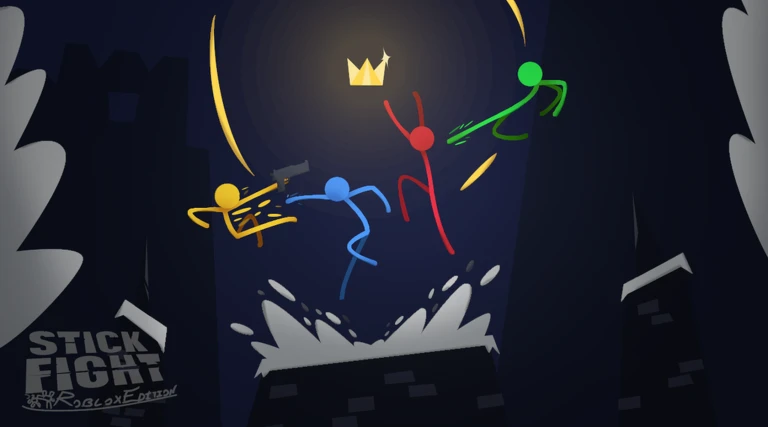
OverviewStick Fight: Roblox Edition is a recreation of the original Stick Fight: The Game, rebuilt inside Roblox as a 2D brawler for up to four players. You fight using attacks, blocks, and thrown weapons across rounds until one player reaches the winning score. This guide covers controls, how rounds and scoring work, the weapons and hazards you will encounter, and how to earn all 14 badges.
What is on this page
Contents
Controls for every platform
Table
The game supports keyboard and mouse as well as gamepad, so pick whichever feels natural.
| Attack | Left Click, or R2 and X on gamepad |
| Block | Right Click or F, or L2 on gamepad |
| Throw weapon | F, or Y Button on gamepad |
| Move left or right | A and D keys, or the left joystick |
| Jump | W or Space, or A Button and L1 on gamepad |
| Crouch | S key, or left joystick down |
MetaNew Player Survey

The next survey is being prepared.
How rounds and scoring work
SummaryEach match is split into rounds. Winning a round adds to your score, and the player who reaches the required score first is declared the game winner.
- Round win earns you score toward the game-winning total
- Game win reach the target score before anyone else
- Losing the game still awards the Participant badge
- 3 rounds in a row without dying unlocks the Domination badge
- 5 rounds in a row without dying unlocks Complete and Utter Stickage
- 4 eliminations in a row without dying unlocks the what's up, danger badge
Special weapons and hazards
CheckAlongside standard fighting, the game spawns special items and events that change how a round plays out. Some of them are also tied to badges, so recognizing them quickly lets you decide whether to chase them or avoid them.
- Pistol weapons eliminate two players within 10 seconds to unlock the DRAW badge.
- Snakes win a round using them to earn the Stickman's Best Friend badge.
- Holy Hand Grenade a powerful explosive; dying to one unlocks the I want to go to the Moon! badge.
- Light-sabre picking it up unlocks The Chosen One badge.
- Admin Gun picking it up unlocks the Isn't it ironic? badge.
- Black Hole a field hazard that appears during matches; simply encountering one unlocks the Uh... Guys? badge.
Server choice and performance
WarnBecause this game runs Roblox as a 2D engine, bugs and performance issues are expected. Public server performance is poor, and mobile support is incomplete. Private servers also unlock admin commands.
Badge completion guide
StepThere are 14 badges in total. Collecting all 13 required ones unlocks Xiao Xiao, the final badge. The optional badge, who's that orange guy, requires matching with a specific player called cooiman5268 and is not needed for completion.
- Welcome to Stick Fight! Die for the first time.
- Winner! and Participant Play through a full game. You earn one whether you win or lose.
- Domination and Complete and Utter Stickage Win 3, then 5 rounds in a row without dying.
- DRAW Eliminate two players with a pistol weapon within 10 seconds.
- what's up, danger Eliminate 4 players in a row without dying.
- Stickman's Best Friend, The Chosen One, Isn't it ironic? Win a round with Snakes, pick up a Light-sabre, and pick up the Admin Gun.
- Uh... Guys?, I want to go to the Moon! Encounter a Black Hole and die to a Holy Hand Grenade.
- Xiao Xiao Automatically unlocks once you have all other required badges.
Community strategy ideas
CommunityThese ideas and tips come from people playing the game. Share your discoveries too!
No strategy ideas yet. Share a tip you discovered.
Share a strategy idea
Stick Fight: Roblox Edition
Glossary
Glossary- Round
- A single bout within a match; winning rounds adds to your score, and reaching the target score first wins the overall game.
- Block
- A defensive action that absorbs an incoming attack, triggered with Right Click, F, or L2 on gamepad.
- Black Hole
- A hazard that spawns on the field during a match; encountering one for the first time unlocks a badge.
- Holy Hand Grenade
- A powerful explosive that can appear during rounds; dying to one unlocks the I want to go to the Moon! badge.
- Private Server
- A separate server instance for invited players only, which also unlocks admin commands.
Common questions
FAQCan I play on mobile?
Mobile is not fully supported.
How many players can join one match?
Matches support up to four players. Private servers are highly recommended if you want a stable session, and they also grant access to admin commands.
Do I need the who's that orange guy badge to complete the game?
No. It is marked as optional and is not required for the Xiao Xiao completion badge. You need all 13 other badges to unlock Xiao Xiao.
How do I throw a weapon?
Press F on keyboard or Y Button on gamepad while holding a weapon.
Game updates can change what is on this page. If you spot something, get in touch and let us know.
