
Keyboard Wars — The three game modes
About
OverviewKeyboard Wars is a PvP minigame collection where you compete against real players in fast rounds. Each match drops you into a randomly chosen mode, so you need to think quickly and adapt.
What is on this page
Contents
The three game modes
Table
When a match begins, the game picks one of three modes at random. You cannot choose which one appears, so understanding all of them matters. Each mode is built around keyboard controls and direct competition with the other players in your lobby.
| Cut players off | chase down other players and sever their connection to claim their keys |
| Territory growth | draw lines to enclose areas and expand the ground you control |
| Word completion | collect letters to complete words |
How a match actually runs
Step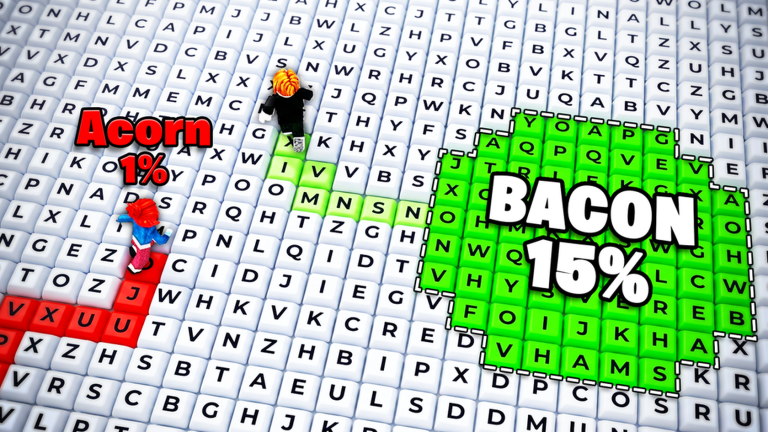
Matchmaking in the lobby pairs you with other players automatically. Once the round starts, the mode is decided and you appear on the stage. After the round ends, scores and rankings are shown, then a new match begins straight away.
- Read the on-screen rules when the mode is revealed
- Use keyboard controls to play through the round
- Review your score and ranking on the end screen
Unlockable keys and sounds
Check
As you keep playing, you unlock new keyboard skins and sound packs. These are available through normal gameplay, meaning free-to-play players can earn them without spending anything.
- Keyboard skins new visual styles for your key that you unlock by playing
- Sound packs alternative music and sound effects that open up over time
- Both types of unlock are available without paying
Tips for scoring better
Tips
Because the mode is random every round, flexibility matters more than mastering just one style of play. The more rounds you complete, the faster you will recognize each mode and know what to do. Watching how other players move and react can also teach you things that are hard to learn any other way.
- Play all three modes repeatedly so none of them catches you off guard
- Watch the on-screen goal the instant a round starts
- Watch other players to pick up strategies
Glossary
Glossary- PvP
- Short for player versus player — every match pits you directly against other real people.
- Round
- One complete play of a single mode, from the moment you appear on the stage to the results screen.
- Keyboard skin
- A cosmetic style for your in-game key that changes how it looks without affecting gameplay.
- Sound pack
- An alternate set of music and effects that replaces the default audio once unlocked.
- Matchmaking
- The lobby system that automatically groups you with other players before a round begins.
Common questions
FAQHow do I get started if I have never played before?
Enter the lobby and let matchmaking place you in a session. When the round begins, read the goal shown on screen and use your keyboard controls. Playing several rounds is the fastest way to get comfortable with how each mode works.
Can I choose which mode I play?
No — the mode is chosen at random after matchmaking fills the lobby.
Do I need to spend money to unlock everything?
No. Keyboard skins and sound packs can both be unlocked through regular gameplay.
Game updates can change what is on this page. If you spot something, get in touch and let us know.
