
Build an ASMR Tower Guide: First steps when you load in
About
OverviewBuild an ASMR Tower is a Roblox tycoon where you buy satisfying ASMR items, place them at your base to earn money, and use that money to keep building a one-of-a-kind obby. This guide covers how to start earning fast, how to design a tower people can actually climb, what to craft with gems, and what to do when you get stuck.
What is on this page
Contents
Player notes and tips
Found a useful trick? Share it with everyone! Notes with screenshots are welcome!
Write a guide note
Build an ASMR Tower
First steps when you load in
Step
Before you buy a single item, locate your base, the shop, the cash collection point, the upgrade screen, and your backpack. The code panel is also worth finding right away, since redeeming every available code gives you extra funds while your balance is at its lowest. Once you know where everything is, pick the cheapest item in the shop and place it near your starting point — just one, so you can watch exactly what it does. Your first goal is simply a short route that a player can climb from start to finish.
- Locate your base
find the area where you are allowed to build before touching anything else.
- Find the code panel
enter all available codes to collect free rewards while your funds are lowest.
- Buy the cheapest item
resist buying several at once; one item shows you what to expect from the rest.
- Place it near the start
putting your first item somewhere far away or high up makes early testing much harder.
- Exit placement mode and walk through
jump and move along your base to confirm the path actually works.
- Collect your cash and pick the next single purchase
repeat this loop rather than rushing to buy in bulk.
MetaNew Player Survey

The next survey is being prepared.
The cash loop you need to keep running
CheckEvery ASMR item you place generates cash over time. If you get absorbed in building and forget to collect, your storage cap fills up and any new earnings are wasted. Adding items one at a time also helps you see exactly which purchase changed your income — to measure this properly, note your balance before and after a single new item and wait the same amount of time each check. When you notice collection filling up faster than you can spend, that is the signal to upgrade your storage capacity rather than buy another item.
- Check that every purchased item is placed at your base, not sitting in your backpack.
- Check the cash storage display before starting a long building session.
- Check that storage is not already full before you walk away from your base.
- Check that you added only one new item at a time so you can measure the income change.
- Check whether a storage capacity upgrade would help more than another item right now.
- Check the shop display for current prices rather than relying on numbers from old videos.
Designing a tower people can actually finish
TipsThink of each section of your obby as three parts: somewhere to build speed, something to cross or jump, and a landing spot where the player can stop safely. Stacking straight up makes the camera clip into walls, so spread your tower sideways as well and leave camera space around tight sections, especially for players on mobile. After you finish each section, close placement mode and run through it from the very start — test it slowly once and at normal speed once, and if you fall in the same spot both times, fix it before adding anything above.
- Always put the landing platform somewhere visible from the jump-off point
hidden landings are the single biggest cause of cheap difficulty.
- Add a wider platform before and after any hard jump so players have a moment to recover.
- Leave camera space around tight sections, especially for players on mobile.
- Test any moving, sliding, or bouncing parts at ground level before placing them high up.
- Space identical platforms evenly so the rhythm feels consistent to the climber.
- Do not cluster all the hard sections together
spread the tricky jumps across the full height of the tower.
Crafting table and gem shop
Tips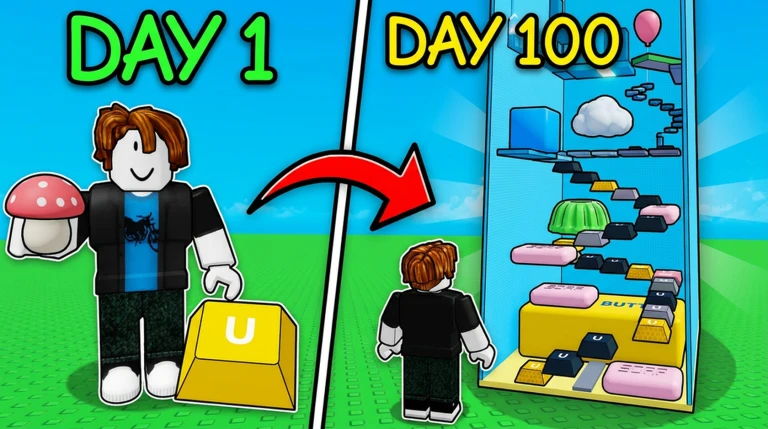
The crafting table lets you combine blocks and cash to make building items such as signs, doors, ladders, fence gates, arrow signs, and glass panels. Gems are earned by finishing near the top in minigames, and you spend them in a dedicated gem shop that stocks building items alongside boosts like a cash-doubling potion, a gem-multiplying potion, and a voucher that swaps the main shop immediately. Before you spend gems on a random box, check whether there is a confirmed item in the shop that solves an actual problem in your tower first.
- Prioritise crafting items that fix a real problem in your tower
wayfinding signs, ladders for vertical sections, and dividers between zones are worth making early.
- Try your first craft with a cheap, spare item so you understand how the system works before committing expensive materials.
- Check the effect and duration of any potion on screen before activating it
do not use a time-limited boost in the middle of a building session if you will not have time to collect.
- Save gems until you know what you want to buy; random boxes are harder to plan around than confirmed shop items.
- Crafting or merging an item does not automatically raise your cash income
only placing items at your base does that.
Upgrades
TableThree upgrades are available: one raises how many items you can place, one expands the building space for your tower, and one increases how much cash your base can hold before it stops accumulating. Robux-based purchases exist but are not required to enjoy building, collecting, and designing your obby.
| Placement limit | raise this when you have run out of slots and want to add more ASMR items. |
| Tower expansion | raise this when you need more rings or floor space to keep building upward or outward. |
| Storage capacity | raise this when your cash display fills up before you have time to collect it. |
| Robux options | treat these as optional extras; the core loop works fully without them. |
Pre-publish checklist for your tower
CheckBefore you open your tower to visitors, play through the whole thing from the same entrance they will use, all the way to the top. Any moving platform, bouncing object, or hazardous block needs at least two test runs with placement mode turned off, because some items behave differently once you are no longer in the editor.
- Check that you can reach the top from the visitor entrance without using placement mode shortcuts.
- Check every moving, bouncing, or hazardous block at least twice with placement mode off.
- Check that the next platform is visible before each jump if it is not, move the landing into view.
- Check that signs or arrows point the way at any fork or confusing section.
- Check that the camera has room to move around tight corners, especially on mobile-sized screens.
- Check any section where you fall more than once and widen or reposition the landing before publishing.
Troubleshooting when progress stalls
Warn
When things stop moving forward, work through one possible cause at a time instead of changing several things at once. Cash problems almost always mean an item is still in the backpack rather than placed, or the storage cap has been hit. If you cannot find an item in your backpack, check each tab — all items, ASMR, blocks, tools, and other — along with the index, before assuming it has disappeared. For bugs that persist across multiple attempts, screenshot the screen before leaving, then rejoin a fresh server.
Redeem codes and how to use them
StepThis game has a code input panel in the game world. Each code can only be used once per account, and some codes expire after a limited time, so entering them early is worthwhile. As of November 12, 2026, three working codes are being tracked for this game.
- Find the code panel
look near signs or prominent objects in the game world.
- Read each code carefully before typing
a single wrong character causes an error.
-
Submit one code at a time and wait for the confirmation message before entering the next.
 Version5
QUESTUPDATE
VERSION7
Multiplayer, worlds, and trading
SummaryA single room holds up to eight players, so you can build alongside friends or welcome visitors to your finished obby. The world system lets other players visit your tower and climb it themselves, and lets you explore theirs via the world board. The trade area is a dedicated space where you can meet players — including those from other servers — to arrange item exchanges.
- Room cap
up to eight players can share one room at the same time.
- Worlds
the system that lets visitors play your tower and lets you explore others via the world board.
- Trade area
a dedicated space where players can meet to exchange items, including with players from other servers.
Staying safe while you play
WarnPublic servers and trade areas bring you into contact with players you do not know. Any trade you enter should be judged only by what the final confirmation screen actually shows — not by what someone said in chat, and not mid-countdown if the contents changed. Because this game uses ASMR audio, some items can be loud; if you are wearing headphones, start with the volume low and adjust from there. External tools that promise automatic building or free Robux put your account credentials at risk.
Glossary
Glossary- Obby
- Short for obstacle course — a jumping and platforming challenge that you design and build yourself in this game.
- Base
- The area assigned to you where you place ASMR items and construct your tower.
- Placement limit
- The maximum number of items you are allowed to have placed at your base at one time, which can be raised through upgrades.
- Storage capacity
- How much cash your placed items can accumulate before new earnings stop adding up, also upgradeable.
- Ring
- A building zone section that expands the usable space for your tower when you purchase the tower expansion upgrade.
- Trade area
- A dedicated in-game space where players can meet to arrange item exchanges, including with players from other servers.
- World
- The system that lets other players visit and play through your finished tower, and lets you visit theirs via the world board.
- Gems
- A separate currency earned by finishing near the top in minigames, spent in a dedicated gem shop.
- Index
- An in-game catalogue that shows which items you own and which you have not collected yet.
- ASMR tool
- Any item available in the shop that, once placed at your base, generates cash over time and also forms part of your tower structure.
- Crafting table
- A station where you combine blocks and cash to produce building items such as signs, doors, ladders, and arrow panels.
Common questions
FAQWhat should I do first when I start the game?
Find the code input panel and enter every available code to get free starting funds. Then buy one cheap item, place it near your starting point, walk through to make sure the path works, and collect your first cash before buying anything else.
Why is my cash not going up even though I bought items?
An item only earns money when it is placed at your base — if it is still in your backpack, it produces nothing. Also check whether your storage display is already full, because a full cap means new earnings cannot accumulate until you collect.
How many players can be in one room at the same time?
Up to eight players can be in a single room at once.
My tower is too hard to climb. How do I fix it?
Start by widening the landing platforms and moving them to spots that are clearly visible from the jump-off point. Adding a wider platform before and after any hard jump gives players room to recover, and that alone fixes most sections that feel impossible.
I typed a code but got no reward. What went wrong?
The most common causes are a typo, a code that has already been used on your account, or a code that has expired. Type carefully, and move on if the error persists.
Do I need to spend Robux to enjoy this game?
All of the core actions — buying items, placing them, collecting cash, and building your obby — are available without spending Robux. Optional purchases exist, but they are not required to progress or to share your tower with other players.
Can I play alone?
Buying items, placing them, collecting cash, and building your tower can all be done solo. Once your tower is finished, the world system lets you publish it so other players can visit and climb it.
What is the difference between cash and gems?
Cash is generated by the items you place at your base and is used for shop purchases and upgrades. Gems are earned by finishing near the top in minigames and are spent in a separate gem shop that stocks building items and boosts.
A shop item I saw in a video is not available. Is something broken?
Not necessarily — the shop lineup can change, and there is no confirmed restocking schedule. Base your decisions on what the shop currently shows rather than prices or items from older videos.
Does making my tower taller increase my income?
Income comes from the items you have placed at your base, not from the height of your tower.
Game updates can change what is on this page. If you spot something, get in touch and let us know.
