
Effortless Tower Guide: Getting started
About
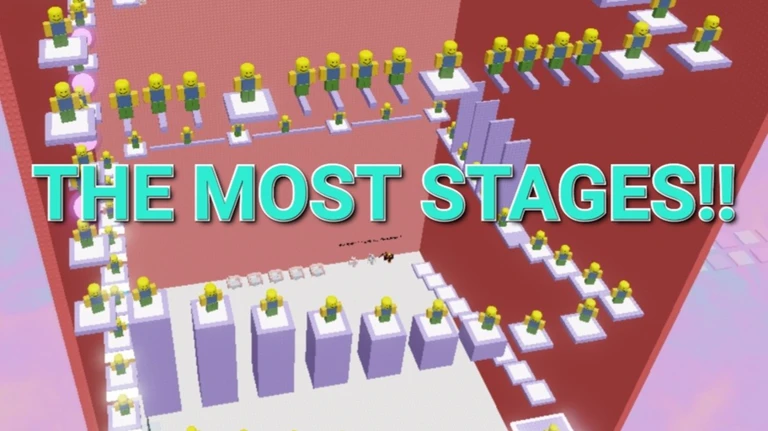
OverviewEffortless Tower is an obby on Roblox with more than 5,800 stages to climb through, one platform at a time. This guide covers how to get started, how to push through the harder middle stages, and what to expect as the difficulty climbs.
What is on this page
Contents
Player notes and tips
Found a useful trick? Share it with everyone! Notes with screenshots are welcome!
Write a guide note
[5800 stage!! ] Effortless Tower
Getting started
Step
When you load in, you are placed at the beginning of the tower. The early stages focus on basic jumping and movement, which makes them a good place to build your control feel before anything tricky shows up.
- Enter the first stage
you are placed there automatically when the game starts.
- Move and jump
use your keyboard and mouse to get a feel for how your character handles.
- Reach the goal
each stage has a clear endpoint; getting there counts as a clear.
- Practice on easy stages
the opening stretch is forgiving, so use it to lock in your timing before difficulty rises.
MetaNew Player Survey

The next survey is being prepared.
How saving works
CheckThe game records your progress each time you finish a stage. When you come back after logging out, you pick up right where you left off. There is no manual save step and nothing to set up.
- Progress saves the moment a stage is cleared no button press needed.
- Logging out does not erase your place in the tower.
- Failing a stage repeatedly costs you nothing there is no penalty for retrying.
Early-stage technique
TipsThe first dozens of stages are mostly about jumping from platform to platform without falling. Precision matters more than speed here.
- Slow down near the edge of any platform
rushing the lip is the most common way to fall.
- Test jump distance before committing
a small hop first tells you how far a full jump will carry you.
- Try as many times as you need
there is no retry limit and no penalty for failing.
- Find a key layout that feels comfortable in your setup before the stages demand precise timing.
When you are stuck
Tips
As the stage count climbs, some obstacles will stop you cold.
- Look for an alternate path
check whether the stage has more than one route before assuming there is only one way through.
- Adjust your timing
try jumping earlier or later, or speed up and slow down at different points.
- Study the pattern
moving platforms and timed obstacles follow repeating rhythms; watch a full cycle before you jump.
Mid-tower and late-tower obstacles
WarnSimple hopping gives way to more complex mechanics as you go higher.
 SAVESKIP
BYEMILITARY
SUMMER
THANKYOU
Stage milestones and badges
SummaryBadges mark your progress at set points throughout the tower. Hitting each one confirms you have cleared everything up to that point and gives you something concrete to chase along the way.
- Stage 100
first milestone badge
- Stage 500
badge awarded
- Stage 700
badge awarded
- Stage 1,000
four-digit milestone
- Stage 1,500
badge awarded
- Stage 2,000
the "End" badge and a thank-you message from the developers
Playing without spending
SummaryEffortless Tower has no purchasing requirement. All players access the same stages under the same conditions, whether they play for ten minutes a day or several hours at a stretch.
- Cost to play
free
- Stages locked behind payment
none
- Spending advantage over other players
none
- Daily play limit
none
Glossary
Glossary- Obby
- Short for obstacle course — a game type where you jump through a series of platform challenges to reach the end.
- Stage
- One individual course in the tower; clearing it means reaching the goal point at the far end.
- Autosave
- The automatic recording of your progress that happens each time you clear a stage.
- Goal
- The endpoint of a stage; reaching it counts as a clear and triggers the autosave.
Common questions
FAQIs there a penalty for failing a stage over and over?
No. You can retry any stage as many times as you like with no penalty. Just keep at it at your own pace.
Does my progress save when I log out?
Yes. Every stage you complete is saved automatically the moment you clear it. When you log back in, you start from the first stage you have not yet finished.
Are there redeem codes for this game?
Yes, there are active codes for this game. Check the codes section on this page for the current working list.
Do I need to spend Robux to reach higher stages?
No. All stages are free to access and no purchase gives any gameplay advantage. Every player competes on exactly the same terms.
Game updates can change what is on this page. If you spot something, get in touch and let us know.
