
Flex Your UGC Limiteds Guide: Sniping a free limited drop
About
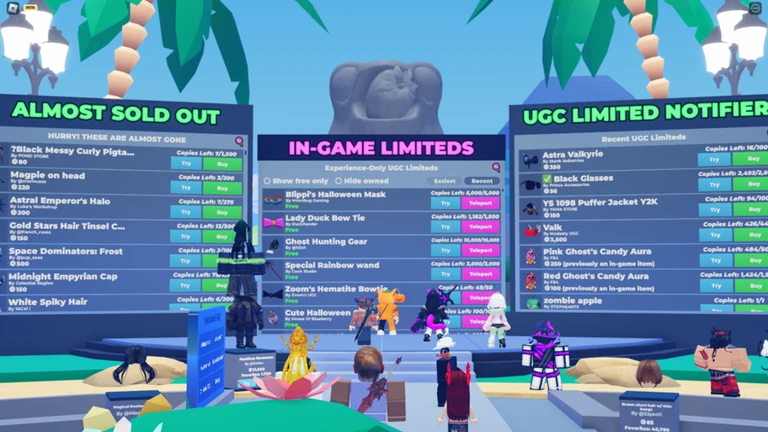
OverviewFlex Your UGC Limiteds is a Roblox game where up to 40 players gather to show off their UGC limited collections, snipe free limited drops, and scout resale deals. This guide covers how to snipe items, use the game's tracking tools, and build your RAP toward the badge milestones.
What is on this page
Contents
Player notes and tips
Found a useful trick? Share it with everyone! Notes with screenshots are welcome!
Write a guide note
Flex Your UGC Limiteds
Sniping a free limited drop
Step
When any free UGC limited drops on the Roblox website, the game automatically shows you a purchase prompt — no captcha stands in the way, so the only thing that matters is your reaction speed. Keep the game open and your eyes on the screen whenever you are expecting a drop.
- Join the game load in and stay in the lobby so the notifier can reach you
- Watch for the prompt a pop-up appears automatically the moment a free limited drops
- Click Buy immediately there is no captcha, so speed is the only barrier between you and the item
- Check your inventory open the UGC limited inventory viewer to confirm the item landed in your collection
MetaNew Player Survey

The next survey is being prepared.
Hyper Sniper setup
Step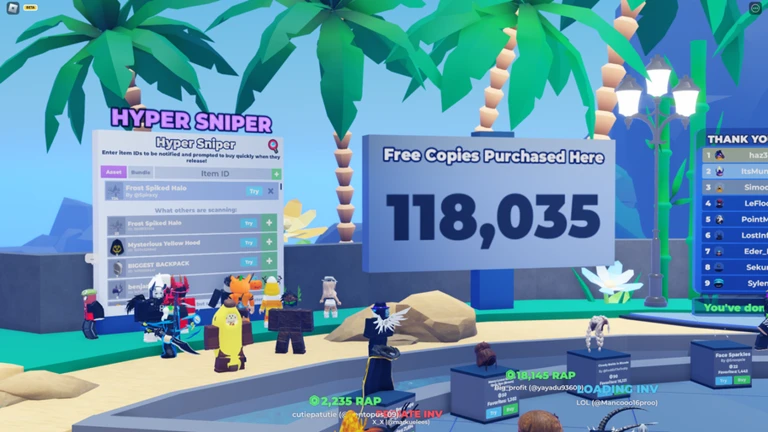
The Hyper Sniper is for items you are targeting in advance. Instead of waiting for a general drop notification, you tell the game exactly which item you want by its Roblox item ID, and it watches for you.
- Find the item ID look up the UGC limited you want on Roblox and note its item ID number
- Open the Hyper Sniper locate the feature inside the game and enter the ID
- Wait for the sale the game monitors that item and fires an automatic prompt the moment it goes on sale
In-game boards and tools
Tips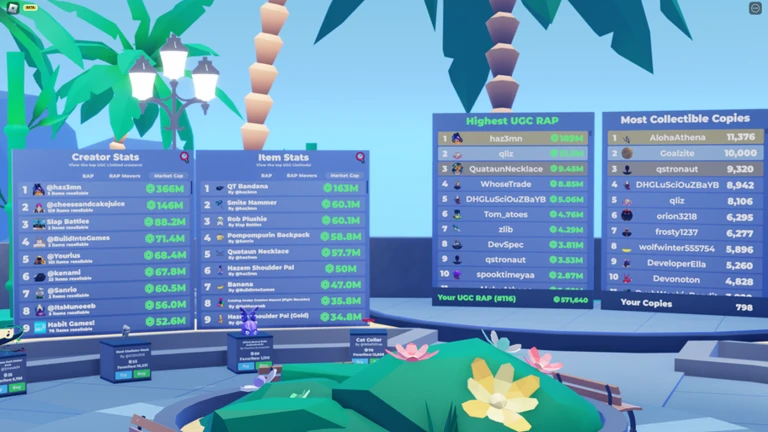
The game packs several tools beyond the sniper. Each one targets a different part of the collector workflow, from tracking market prices to comparing inventories.
- The Limited Deals board automatically scans UGC limited resales so you can spot bargains without leaving the game
- The Resale Timers board shows when a specific item will become resellable, helping you plan ahead
- The Recent Item Resales board displays the latest completed sales so you can read where prices are moving
- The UGC limited inventory viewer lets you browse your own collection and compare it against other players' rankings
- The teleport feature sends you directly to other Roblox games that are dropping free or paid limiteds
RAP milestones and badges
SummaryRAP stands for Recent Average Price — it reflects what your items have been selling for lately, and the sum of your whole inventory's RAP is the number that unlocks badges. Check your current total in the inventory viewer so you always know how far you are from the next milestone.
- 10,000 RAP first badge milestone
- 100,000 RAP mid-tier milestone
- 1,000,000 RAP the top badge
Glossary
Glossary- UGC Limited
- A user-created Roblox item made available in a limited quantity, making it collectible and tradeable.
- RAP (Recent Average Price)
- The average price at which an item has sold recently, used as a measure of its current market value.
- Sniping
- Buying a limited item the moment it drops or goes on sale, before other players can get it.
- Hyper Sniper
- An in-game feature where you enter a specific item's ID so the game alerts you the instant that item goes on sale.
- Inventory Viewer
- An in-game tool that displays your UGC limited collection and lets you compare your RAP ranking with other players.
Common questions
FAQHow do I snipe a free limited without missing the prompt?
Stay inside the game whenever you expect a drop — the automatic prompt only appears if you are already in the session. Because no captcha is required, all you need to do is click Buy the moment the pop-up shows.
What is the Hyper Sniper and when should I use it?
The Hyper Sniper lets you enter the Roblox item ID of a specific UGC limited you want. When that item goes on sale, the game sends you an instant purchase prompt without you having to watch the general feed.
How do the RAP badges work?
Three badges are tied to the total RAP of your UGC limited inventory: one at 10,000 RAP, one at 100,000 RAP, and one at 1,000,000 RAP. You can track your current total in the inventory viewer.
Game updates can change what is on this page. If you spot something, get in touch and let us know.
