Games listed 43,080
Game guide

Legends Battlegrounds Guide: Controls every player needs to know

Legends Battlegrounds
Arts of Vermillion, Playing 5.6K, Rating 86.8%
Creator Arts of Vermillion
Playing 5.6K
Rating 86.8%
Is this game fun?8 votes
Fun 88%7Average 13%1Not fun 0%0

About

Overview

Legends Battlegrounds is a Roblox PvP fighting game where you pick a stickman fighter — original or anime-inspired — and battle other players to prove you're the ultimate legend. This guide covers the controls, how to get started, character-specific techniques, and what to check when you keep losing.

What is on this page

Contents
01

Controls every player needs to know

Table
In short Learning all six keybinds before your first real fight gives you a huge head start.

The game runs on a tight set of keys, and knowing what each one does in a split second is the difference between winning and losing. You can play on any device, but a keyboard lets you hit each input precisely.

Left Clickyour basic attack; chain several in a row for a combo
Qdash toward or away from your opponent to close or create distance
Q (while ragdolled)evasive cancel that lets you recover from being knocked down quickly
Fblock to reduce damage from incoming attacks
Gawaken, an alternative way to get up from a ragdolled state
Bemote wheel
Ask on the board
02

Techniques that give you an edge

Tips
In short Even one or two of these techniques mixed into your combos can make your play much harder to deal with.

Techniques are community-discovered extensions to normal combos. They take advantage of hitboxes and timing windows. Some are simple; some need precise execution. None of them will work every time, but understanding them helps you both use them and defend against them.

Tips worth knowing
  • Endlag cancel — if you whiff your fourth M1, side-dash immediately after to erase the recovery animation
  • Uplift — throw three M1s, then jump and follow with an uppercut into another move to launch your opponent
  • Side Dash reposition — after ragdolling someone (ideally with a Downslam), side-dash away, wait for the right moment, then forward-dash back in to continue your combo; right after connecting you should press F to block, since the technique no longer stuns the opponent on its own
  • Martial Legend — Tiger's Grasp: Downslam your opponent and stand over them, then activate Tiger Palm; the reduced knockback lets you chain more hits
  • Martial Legend — Panther Continuation: after four M1s, immediately follow with Panther Combo; this is ping-dependent
  • Martial Legend — Wall Combo Extend: when near a wall or tree, press the dash button after a move ends to wall combo the opponent; this can sometimes waste the opponent's evasive maneuvers if timed correctly
  • Martial Legend — Triple Kick Rush: after landing Triple Kick Counter, side-dash and use Dragon Rush
  • Jun — Tearing Fang: intentionally miss the second hit of Wolf Fang Slash by angling it slightly to one side, then side-dash to your opponent and start a fresh M1 chain
  • Jun — Virgule Downfall: after ragdolling the opponent, time Virgule Cascade to pick them up before they can attack, dealing damage while you safely wait for cooldowns
03 Live and upcoming events Events

Events running now or coming soon. They have fixed dates, so check them first.

Live now –

UPDATE

ACTIVE NOW! CHECK IT OUT

Upcoming –

FUTURE UPDATE

PLACEHOLDER

See the whole schedule
04

Martial Legend — the beginner's character

Check
In short Martial Legend is the most straightforward character in the game and a solid home base while you learn.

Martial Legend was the first character added to the game and one of two free completed characters. It has no move variants to memorize, all abilities are direct, and it carries a passive that rewards aggressive play. It also has an anti-team mechanic that hits multiple opponents at once with an AOE.
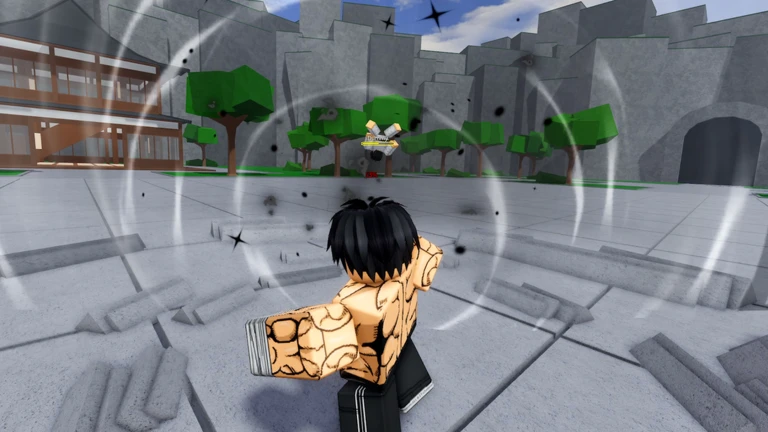
  • After landing Triple Kick Counter, your movement speed and M1 speed increase
  • Use Panther Combo and Dragon Rush when fighting multiple opponents, since both have invincibility frames
  • When extending with Dragon Rush, forward-dash just before the opponent touches the ground so you don't fly past them, or side-dash and catch them with an M1
  • Near a wall, use Panther Combo and dash right after to wall-combo without needing the full four-M1 setup
  • Against Jun or another Martial Legend, watch for the counter animation start-up turn away quickly to waste it and leave them open
  • When an enemy uses Panther Combo against you, time your evasive for Tiger Palm or the Downslam to punish
  • When the opponent uses Fang Dance, you can counter their Fang Dance, wasting their combo extender; however, countering too early can cause them to turn away, wasting your counter and leaving you vulnerable
Stuck? Try a video
Every Character in Legends Battlegrounds Vs Combat Gods
Fighting the OWNER to Unlock KRATOS ADMIN MOVESET..
JUN got a new 100% COMBO and it's actually BROKEN! | Legends Battlegrounds ROBLOX
See more guide videos
05

What to check when you keep losing

Warn
In short Most losses trace back to one of a handful of fixable habits rather than the character you picked.
Worth watching out for
Blocking too late press F the moment you see the opponent's attack begin
Recovering from ragdoll too slowly Q should be the first thing you press the instant you hit the ground
Techniques like Panther Continuation are ping-dependent; if they keep dropping, use an uppercut into Panther Combo as a more reliable alternative

Community strategy ideas

Community

These ideas and tips come from people playing the game. Share your discoveries too!

No strategy ideas yet. Share a tip you discovered.

Glossary

Glossary
M1
A single Left Click attack; four in a row is a standard M1 chain.
Ragdoll
The state where your character is knocked flat; press Q to cancel out of it quickly.
Combo Extender / Technique
A community-discovered sequence of moves that lets you keep the opponent in a continuous chain.
Endlag
The brief recovery animation after an attack; it can sometimes be cancelled with a side-dash.
Evasive Cancel
Using Q while ragdolled to snap out of the knockdown faster than the standard get-up.

Common questions

FAQ

Which character should I pick first?

Martial Legend has no move variants, all its abilities are straightforward, and it was the first character added to the game.

Can I play this on a phone?

Yes, the game runs on any device.

How do I stop getting combo'd to death?

Press Q the instant you get ragdolled to cancel it quickly. Outside of ragdoll, pressing F to block breaks incoming attacks.

Updated Sep 11, 2026
Game updates can change what is on this page. If you spot something, get in touch and let us know.
Legends Battlegrounds Arts of Vermillion, Playing 5.6K, Rating 86.8%
See the game pageAsk on the boardWatch guides and let's plays
Add it to your home screen and it works like an app. One tap to open, and it loads faster after that.

