
Blox Mod — Getting started in the sandbox
About
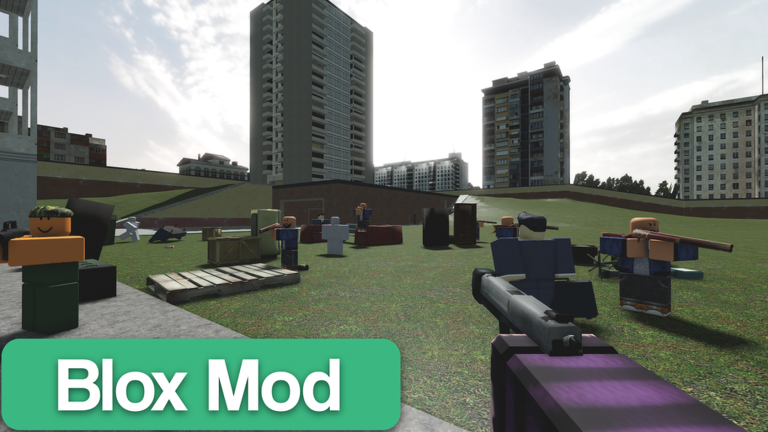
OverviewBlox Mod is a physics-based sandbox game inspired by Garry's Mod, where you spawn props, NPCs, and weapons and mess around with them using a physics gun. There are no missions or objectives — you decide what to do. This guide walks you through the physics gun, how to place things, and ideas for keeping yourself busy.
What is on this page
Contents
Getting started in the sandbox
Step
When you load in, you are dropped straight into the sandbox world with no tutorial forcing you along. Take a moment to look at the menus on the bottom and right side of the screen — that is where your tools and props live. Once you know what is there, grab the physics gun and start experimenting on whatever props are already in the world.
- Open the menus check the buttons on the bottom and right of the screen to see the full list of available tools and props.
- Pick up the physics gun select it from your tools so it is in your hand.
- Grab a nearby prop point the physics gun at any prop in the world and use the grab command to lift it.
- Try every basic move rotate it, freeze it in place, then let it go, so you know what each action feels like.
What the physics gun actually does
CheckThe physics gun is the central tool in Blox Mod. Every creative idea in the game runs through it, so knowing all four of its actions before you try to build anything complicated will save you a lot of frustration.
- Grab point at a prop or NPC and fire to lift it off the ground.
- Rotate while holding something, press the rotation key or button to turn it to any angle you need.
- Freeze lock a prop completely still so it stops moving, which is essential when you are building something that needs to stay in place.
- Release let go of whatever you are holding and drop it wherever you aimed.
Placing props and NPCs
TipsProps are the objects you build with — parts, decorations, and items of all kinds. NPCs are characters you can place and then interact with through the physics gun. Both come from the same menus, and neither costs anything to use.
- Open the prop or NPC menu and scroll through to see what is available before you commit to a build idea.
- Tap or click an item to select it, then tap or click a spot in the world to place it there.
- You can place the same prop over and over, so repeat placement is how you build up larger structures.
- NPCs can be placed anywhere props can, and you can push or freeze them the same way.
Ideas for what to actually do
TipsBecause Blox Mod has no built-in objectives, the game never tells you what to do next. That is a feature, not a problem. Picking even a tiny goal — build a tower, line up a row of NPCs, make something collapse — gives you a direction.
- Try building something recognisable: a bridge, a wall, or a simple room using stacked props.
- Set up a physics experiment — stack props and then knock them over, or freeze them in midair to see what the frozen state looks like.
- Place a group of NPCs and then interact with them using the physics gun.
- Challenge yourself with a constraint, such as using only one type of prop to build something.
- Recreate a scene from a film or game using the props and NPCs available in the menus.
Playing with friends
SummaryJoining the same server as a friend is all it takes to share a world. From there, everyone can place props, run the physics gun, and build at the same time.
- Joining get into the same server as your friends and you are automatically in the same world.
- Co-op building split up tasks, for example one person places props while another uses the physics gun to position them precisely.
- Respect avoid breaking things other players are actively working on, since everyone shares the same world.
- Cost multiplayer is available at no extra charge, just like the rest of the game's core features.
When you feel stuck
WarnBlox Mod has no quests, no levels, and no progress bar. If you open the game and feel lost, that is the sandbox format, not a bug or a barrier.
Glossary
Glossary- Physics gun
- The main tool in Blox Mod, used to grab, rotate, freeze, and release props and NPCs.
- Prop
- Any placeable object in the world, from building parts to decorative items, that you can move with the physics gun.
- NPC
- A non-player character you can spawn into the world and interact with using the physics gun.
- Freeze
- A physics gun action that locks a prop completely in place so it cannot move.
- Sandbox
- A style of game with no set objectives, designed to let you experiment and create freely.
- Spawn
- To call something into the world from a menu, placing it at a chosen location.
Common questions
FAQDo I need to complete anything to unlock more props or tools?
No. The core features — the physics gun, prop placement, and NPC spawning — are all available from the moment you load in.
What happens if I destroy or lose a prop?
You can spawn the same prop again from the menu as many times as you like, so feel free to knock things over or start fresh whenever you want.
Is this the same as Garry's Mod?
Blox Mod is a fan-made recreation inspired by Garry's Mod, so the core ideas — a physics gun, free prop placement, no objectives — are very similar. It is not made by or connected to Facepunch or Valve, the creators of the original game, and has its own design and content.
Can I play this by myself, or do I need friends?
The game works as a solo experience. Multiplayer is available if you want it, but everything the physics gun and menus offer is just as accessible when you are playing alone.
Game updates can change what is on this page. If you spot something, get in touch and let us know.
