
BIRD Guide: Getting started as a bird

About
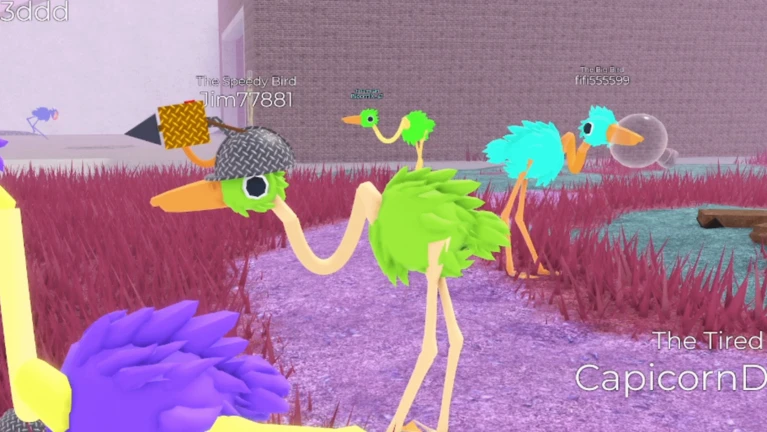
OverviewBIRD is a relaxed roleplaying game on Roblox where you play as a bird — flying, walking around, and hanging out with other players. There are no hard rules or goals to chase, so you set your own pace.
What is on this page
Contents
Player notes and tips
Found a useful trick? Share it with everyone! Notes with screenshots are welcome!
Write a guide note
BIRD
Getting started as a bird
Step
When you first join, you choose what kind of bird you want to be. Once you have picked one you like the look of, you are ready to go.
- Choose your bird
pick based on look or colour, whatever appeals to you.
- Try the movement keys
walk around to get a feel for how your bird handles.
- Try the flight keys
take off and land a few times until it feels natural.
- Explore the world
once the basics click, go wherever you like.
MetaNew Player Survey

The next survey is being prepared.
How roleplaying works here
TipsRoleplaying means acting as your bird character: speaking in character through the in-game chat, reacting to what other birds do, and making up stories on the fly. Nobody tells you what the story has to be, which is exactly the point.
- Use the in-game chat to speak as your bird, not just as yourself.
- Give your bird a personality or backstory
it makes interactions more fun.
- If you join a group, agree on a loose set of rules before the story starts.
- Take breaks whenever you want.
Customising your bird's look
CheckYour bird does not have to stay looking the way it did when you first joined. The game includes a customisation menu where you can change colours and add decorations. Some cosmetic items are free, while others require payment.
- Open the customisation menu and browse all the appearance options available to you.
- Try on free decorations before deciding you need anything that costs Robux.
Staying safe with other players
Warn
Because this game is built around chatting with other players, it is worth thinking about how you interact.
When something goes wrong
StepIf the game behaves strangely — controls stop responding, chat disappears, or you get stuck — try these fixes.
- Rejoin the game
a fresh load clears most temporary glitches.
- Check your internet connection
an unstable connection causes a lot of odd behaviour.
- Try a quieter time
joining when fewer people are online can reduce server strain.
- Switch devices or browsers
if only one device has the problem, the issue is local.
The MODLS button
SummaryThe game is actively paying people to create models for it. If that interests you, join the game and click the MODLS button — it gives you the details you need to find out more and get involved.
- MODLS button
found inside the game, leads to information about contributing models.
- Model work
the development team is paying contributors for this.
Glossary
Glossary- Roleplaying
- Acting as your character during the game — speaking, moving, and making decisions as if you really were a bird.
- Customisation menu
- The in-game screen where you change your bird's colours and decorations.
- MODLS button
- A button inside the game that shows information about contributing models to the development team.
Common questions
FAQDo I actually play as a bird?
Yes — you pick a bird, and that is your character for the whole session. You fly, walk, and chat as that bird throughout the game.
Are all the cosmetic items free?
Some decorations are available without spending anything, but others require payment. Check the free options in the customisation menu first.
Is this game hard to learn?
No — if you can move and fly your bird, you know enough to play.
Game updates can change what is on this page. If you spot something, get in touch and let us know.
