
Retail Tycoon 2 Guide: Setting up your store from the start
About
OverviewRetail Tycoon 2 is a business simulation game where you build a shop from scratch, stock shelves, hire staff, and grow your store into a large retail operation. This guide walks you through setting up your first store, managing money, keeping customers happy, and expanding without going broke.
What is on this page
Contents
Player notes and tips
Found a useful trick? Share it with everyone! Notes with screenshots are welcome!
Write a guide note
Retail Tycoon 2
Setting up your store from the start
Step
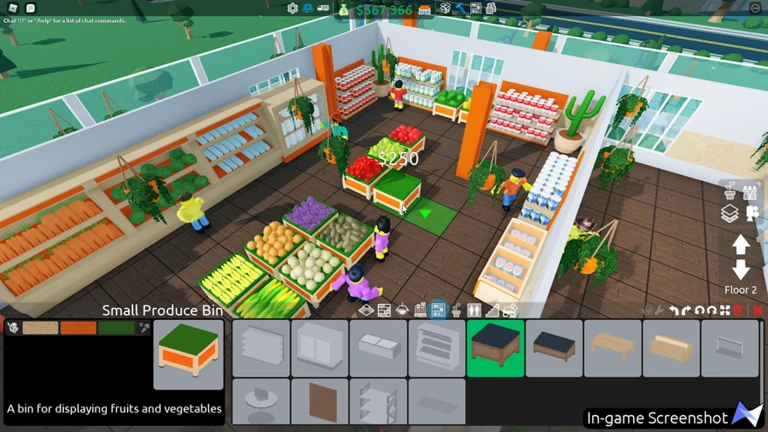
When you first load in, your store is empty and needs basic furniture before anything can be sold. Place shelves and registers so the layout is easy for customers to move through. Once the layout is in place, hire a worker or two and then head to the supply dock to buy your first products. Bring those products back and place them on the shelves so customers can actually purchase them.
- Place shelves
set these down first so you have somewhere to put stock.
- Place registers
customers need a checkout point or they cannot buy anything.
- Hire staff
start with one or two workers to keep wage costs low.
- Visit the supply dock
this is where you buy products to bring into the store.
- Stock the shelves
put your purchased products on the shelves to make them available for sale.
MetaNew Player Survey

The next survey is being prepared.
Keeping money in the positive early on
TipsThe biggest trap in the early game is spending too much on wages before your sales can cover them. Keep your staff count low and focus on products that sell quickly so cash keeps coming in. Empty shelves mean no sales, so checking your stock regularly matters more than anything else at this stage. Once your daily income is steady, you can safely spend on expanding the store and adding more shelves.
- Start with as few staff as possible to avoid wage losses eating your profits.
- Only expand the store's size or product range after income is stable.
Staff count vs. store size
Table
Staff do the work of restocking shelves and handling registers, but each one costs wages every day. Hiring too many before sales support it pushes you into the red. As your store grows and daily revenue climbs, adding more staff becomes safer and keeps the larger operation running smoothly.
| Small store | one or two staff members covers restocking and registers without overspending on wages. |
| Mid-size store | add staff once daily sales are consistently covering current wages with money left over. |
| Large store | a bigger team is worth the cost when the sales floor is too large for a small crew to keep stocked. |
Keeping customers happy
CheckCustomer satisfaction determines how well your store performs over time. Stocking a wide range of product categories means more customers find what they want. Register placement affects how long checkout lines get, and a crowded checkout area drives customers away. Keeping the store clean and easy to walk through encourages repeat visits.
- Shelves are stocked with several different product categories, not just one or two.
- Registers are placed so no part of the store creates a bottleneck at checkout.
- Staff are spread across the floor so shelves stay filled during busy periods.
- Store layout is clear and walkable with no cluttered dead ends.
- Restocking happens before shelves go empty rather than after.
Troubleshooting a store that stops growing
Check
If your money stops growing or customers seem unhappy, run through these checks before making big changes.
- Shelves are not sitting empty an empty shelf earns nothing.
- Staff are actually moving around and working, not stuck.
- Wage costs are not higher than daily sales revenue.
- No single product is priced so far above the going rate that customers skip it.
- The store layout is not blocking customer paths to shelves or registers.
Recent additions worth knowing
SummaryUpdates released in early 2025 added decorations and a new product category alongside a layout tool that gives you more control over how customers move through your store. These are worth incorporating into a growing store.
- Balloon decorations
heart-shaped ones are also available, added February 13, 2025.
- Wooden fence decoration
another cosmetic option for store design, added February 13, 2025.
- Paper goods
a new sellable product category added to the supply dock as of February 13, 2025.
- One-way gates
placed in your store to direct customer pathing, added February 13, 2025.
Glossary
Glossary- Shelf
- A piece of furniture you place inside your store to display products for customers to buy.
- Register
- The checkout machine where customers pay; without one, sales cannot be completed.
- Supply dock
- The area outside your store where you purchase products to bring in and stock on shelves.
- Staff
- Workers you hire to restock shelves and operate registers; each one charges a daily wage.
- One-way gate
- A layout tool added in February 2025 that controls which direction customers can walk through a section of your store.
- In the red
- When your daily wage costs are higher than your sales revenue, leaving you losing money each day.
Common questions
FAQHow do I know which products to stock?
Start by trying several of the basic products available at the supply dock and watch which ones sell fastest. Once you spot the best sellers, prioritize restocking those and gradually add other categories as your income grows.
Do I need to spend Robux to build a big store?
Retail Tycoon 2 can be played without spending Robux. Building up to a large store takes consistent play and smart money management, but it is achievable through in-game earnings alone.
Game updates can change what is on this page. If you spot something, get in touch and let us know.
