
Pop It Trading — How trading works
About
OverviewPop It Trading is a Roblox game where you swap toys with other players on a shared board. This guide walks you through redeeming free coins, making trades work, building up your toy collection, and avoiding common mistakes.
What is on this page
Contents
How trading works
Step
The whole game runs through a single loop: find a partner, put your toys on the board, and press the button together. Both players have to agree before anything moves.
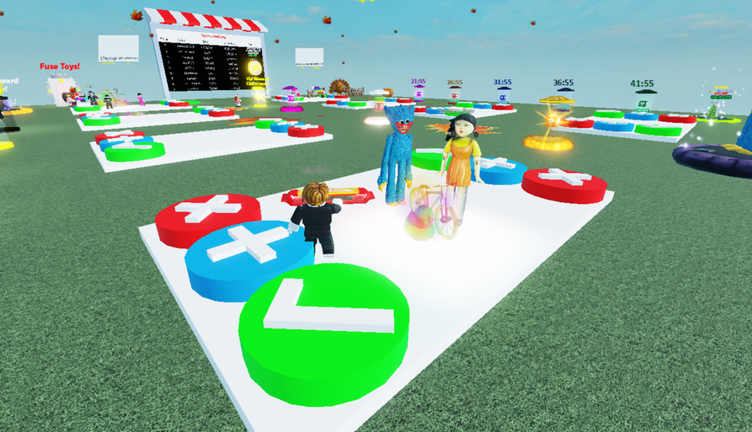
- Stand on the board together you both need to be on the same board for a trade to be possible.
- Drop your toys choose the toy you want to offer and place it so the other player can see it.
- Check what they dropped make sure you actually want the toy they are offering before you go any further.
- Jump on the green button both players must hit the green button at the same time to confirm the swap.
Redeeming codes for free coins
CheckThe game gives out codes that add free coins to your account. Each code works only once per account, and codes can expire, so redeem every available one the moment you see it. This site was tracking three working codes as of October 10, 2026.
- Open the code menu from the in-game interface right after loading in.
- Enter every code you have not used yet used codes return an error, so skip those.
- Like the game on its Roblox page, since the developers release a new code once the game reaches each likes milestone.
- Check back each time you visit, because new codes are added regularly.
 trade2022
like90k
coins
like80k
trade2022
like90k
coins
like80k
When a trade does not go through
Warn
If the swap does not happen after you press the green button, run through this list before trying again.
Glossary
Glossary- Board
- The shared space where two players stand to drop their toys and complete a trade.
- Green button
- The trading button that both players must jump on at the same time to confirm a swap.
- Lobby
- The starting area where players gather and look for trading partners before moving to a board.
- Pop It
- A silicone toy that is the most common item in the game and the easiest type to find trading partners for.
- Code
- A text string you enter in the in-game menu to receive free coins; each code can only be used once per account.
Common questions
FAQWhere do I find new codes?
Check the in-game menu each time you load in, and look at the game's Roblox page description before joining. The developers drop a new code each time the game hits a new likes milestone, so liking the game helps unlock them.
Game updates can change what is on this page. If you spot something, get in touch and let us know.
