
Adventure Builder 2 — Basic controls
About
OverviewAdventure Builder 2 is a 2D game where you create levels, play levels made by others, and compete in Endless Mode. This guide covers the controls, how to get started, how to build and publish levels, and how Endless Mode and other features work.
What is on this page
Contents
Basic controls
Summary
Movement and jumping are the only controls you need to play through any level. The editor adds a few extra shortcuts for building.
- Move left or right A, D, or the left and right arrow keys
- Jump Space
- Rotate an object in the editor R (works only on supported objects)
- Select a region of objects in the editor hold Ctrl and drag the selection box
- Select specific objects in the editor hold Ctrl and Shift, then click each object
Getting started on your first session
StepWhen you first load in, the game is already tracking a few things you can knock out quickly. Each of these steps rewards you with a badge.
- Play a level clear any published level to earn the First Victory badge
- Favorite a level add any level you enjoyed to your favorites to earn the Stamp of Approval badge
- Claim a Daily Quest collect your first reward to earn the First Quest badge
- Log in again tomorrow returning every day starts your login streak, which unlocks badges at 3 days, 1 week, 2 weeks, 1 month, 2 months, and 100 days
Building and publishing a level
Tips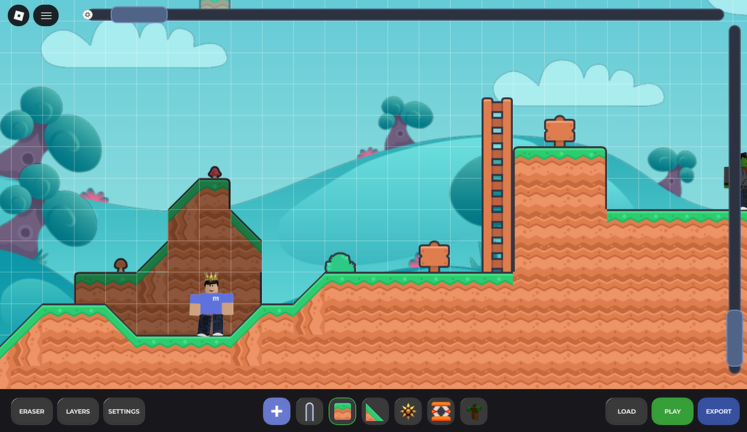
The editor lets you place and arrange objects to build a level from scratch. Two shortcuts make building much faster once you know them.
- Press R to rotate any object that supports rotation — not every object does, so test it as you place things.
- Hold Ctrl and drag to select a whole region of objects at once.
- Hold Ctrl and Shift, then click individual objects to add them to your selection one by one.
- When your level is ready, publish it to earn the From Player to Builder badge.
- Add at least one collaborator before publishing to also earn the Collaborator badge — it is a separate badge from solo publishing.
Ghost races and gem donations
CheckTwo badges are tied to interacting with other players rather than building or completing levels.
- Race a ghost finish a level faster than another player's ghost recording to earn the Ghost Buster badge
- Donate gems send any amount of gems to another player to earn the Buy Yourself Something Nice badge
Endless Mode milestones
TableEndless Mode asks you to clear levels back to back without stopping. A badge unlocks at each of the six checkpoints below.
| 10 levels cleared | Endless Apprentice badge |
| 20 levels cleared | Endless Challenger badge |
| 50 levels cleared | Endless Survivor badge |
| 100 levels cleared | Endless Veteran badge |
| 500 levels cleared | Endless Legend badge |
| 1000 levels cleared | Endless Immortal badge |
Glossary
Glossary- Level
- A single playable course created in the editor and published for others to run through.
- Editor
- The in-game tool where you place and arrange objects to build a level before publishing it.
- Endless Mode
- A mode where you clear levels one after another continuously, with badge milestones at 10, 20, 50, 100, 500, and 1000 clears.
- Ghost Race
- A race against a recording of another player's run through a level, where beating their time earns a badge.
- Daily Quest
- A task that resets each day and rewards you when you claim its completion.
- Collaborator
- Another player you add to a level project so that both of you work on it together before publishing.
- Gems
- The in-game currency, which can be donated to other players.
- Login Streak
- A count of consecutive days you have logged in, which unlocks badges at 3, 7, 14, 30, 60, and 100 days.
Common questions
FAQCan I play Adventure Builder 2 for free?
Yes, the game is free to play on Roblox. Creating and publishing levels does not cost anything extra.
Can I build a level with a friend?
Yes, the collaborator feature lets more than one person work on the same level. Publishing a level that includes at least one collaborator earns you the Collaborator badge, which is separate from the badge you get for publishing alone.
How far do I need to go in Endless Mode to earn all its badges?
The milestones are 10, 20, 50, 100, 500, and 1000 clears, with a badge at each checkpoint.
Game updates can change what is on this page. If you spot something, get in touch and let us know.
