
Freekick Simulator — Getting started
About
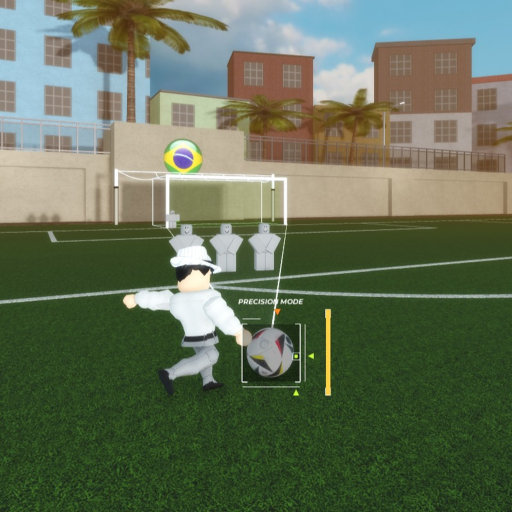
OverviewFreekick Simulator puts you in control of a soccer free kick: pick your position, adjust your power and angle, and beat the AI goalkeeper. This guide covers how to shoot effectively, use the replay feature, and climb the global leaderboards.
What is on this page
Contents
Getting started
Step
When you load in, a menu appears where you choose your free kick position before anything else. Each position has a different distance and angle to the goal, so your first few shots are really about learning how the controls feel.
- Open the menu choose any free kick position you want to start from.
- Check power and angle adjust both before you hit the shoot button.
- Take the shot watch where the ball goes relative to the goalkeeper.
- Skip orange or red menu items those positions are currently unavailable, so leave them alone.
Shooting tips that actually help
TipsThe AI goalkeeper is set to amateur mode, so it can be beaten with good technique — but it will still stop simple shots aimed straight at the center. Repeating shots from the same position is one of the fastest ways to learn the goalkeeper's patterns.
- Aim for the corners of the goal frame rather than the middle — corners are harder for the keeper to reach.
- Too little power and the keeper catches it easily; too much and the ball sails over the bar.
- Switch between your left and right foot — each produces a different ball curve.
Using the replay feature
StepAfter every shot you can pull up footage of what just happened. Use it after both goals and misses — a successful shot tells you what angle and power to repeat, and a miss shows you exactly where the ball went wrong.
- Tap the replay button footage of your previous shot starts playing immediately.
- On a goal note the power level and angle so you can reproduce the shot.
- On a miss watch the ball's path and the keeper's movement to find what went wrong.
How the leaderboard resets work
TableThe global leaderboard tracks scores across three time windows at the same time.
| Hourly reset | the leaderboard clears every hour. |
| Daily reset | the leaderboard clears every day. |
| Weekly reset | the leaderboard clears every week. |
Choosing your free kick position
TipsDistance and angle to the goal vary by position, which directly changes how difficult it is to score.
- The reworked menu lets you choose any available free kick position you want.
- Distance and angle to the goal differ by position.
Milestone badges and donation rewards
TipsThe game has six badges. Some are awarded automatically for playing during visit milestones, and those holders receive free in-game cosmetics. Donation badges also unlock cosmetics for players who contribute.
- The Welcome badge is earned simply by playing the game for the first time.
- The Million Countdown, 5M Special, and 10M Club badges were given to players present at major visit milestones — holders receive free cosmetics.
- Donating in-game earns the Thank You for Donating badge, and larger donations earn the Ultra Donation badge, which also comes with cosmetics.
Glossary
Glossary- Free kick
- A set-piece shot in soccer where you kick a stationary ball from a chosen spot on the pitch — the core action of this game.
- AI goalkeeper
- The computer-controlled keeper that tries to stop your shots; it is currently set to amateur difficulty.
- Global leaderboard
- A worldwide ranking of player scores that resets on three separate cycles: every hour, every day, and every week.
- Replay
- A feature that plays back footage of your most recent shot so you can study what went right or wrong.
- Custom position
- The ability to choose any available free kick spot from the menu rather than being locked to one location.
- Amateur mode
- The current difficulty setting for the AI goalkeeper.
Common questions
FAQWhy can't I select some menu options?
Items shown in orange or red text are currently unavailable because the game is still in development. Just ignore them and choose from the positions that are fully selectable.
How do I rank on the leaderboard?
Score as many goals as possible from your chosen position. Because the leaderboard resets every hour, every day, and every week, there are constant fresh opportunities to climb.
Does switching feet actually matter?
Shooting with your left foot versus your right foot produces a different curve on the ball. Practicing both gives you more options in the same position.
Is the goalkeeper difficulty fixed?
The goalkeeper AI is currently set to amateur mode. The game is still being developed, but for now it is at that level.
Game updates can change what is on this page. If you spot something, get in touch and let us know.
