
夏祭りRP Guide: Three ways to spend your time
About
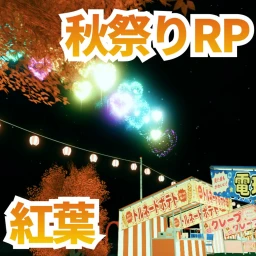
Overview夏祭りRP!is a Japanese summer-festival roleplay game on Roblox where you can run a food stall, play carnival games, or simply wander the grounds and soak up the atmosphere. Up to 80 players share one server at a time.

What is on this page
Contents
Player notes and tips
Found a useful trick? Share it with everyone! Notes with screenshots are welcome!
Write a guide note
夏祭りRP!🎆 [🇯🇵 花火大会!]
Three ways to spend your time
Table
The festival grounds give you three distinct things to do, and you can move between them freely. No single activity is required, so follow whatever sounds fun at the moment.
| Run a food stall | cook dishes and sell them to other players in your server |
| Play carnival games | try goldfish scooping, shooting gallery, fortune telling, and other classic festival activities |
| Explore as a visitor | walk the grounds and take in the summer night |
MetaNew Player Survey

The next survey is being prepared.
Controls on every device
CheckTo use a stall or start a carnival game, walk up to it and tap or click the button that appears on screen. On PC, the game sometimes shows a key such as E as an on-screen hint — check each spot because the prompt can change from place to place.
- PC movement uses W, A, S, D to walk and Space to jump
- Mobile movement uses the on-screen joystick, with action buttons appearing near the target
- To interact with anything, walk close until the prompt button shows, then press it
- If the button does not respond, step back slightly, face the target directly, and put away any item you are holding
- On mobile, if the button is hidden behind your fingers, hold the device horizontally it makes the buttons easier to spot
Running a food stall
StepWalk up to a cooking station or tool and follow the on-screen prompts in order. If the process stops mid-way, run through the checks below before you try anything else.
- Approach the station
walk up to the cooking tool or counter until the action button appears, then press it
- Follow one step at a time
complete each prompt fully before moving to the next; do not press the same button repeatedly if nothing happens
- Check your hands
if progress stops, see whether you are still holding food or ingredients and put them down first
- Find the handoff counter
some stalls have a separate spot to place finished food; if a customer is waiting, place the dish on the counter rather than handing it directly
- If nothing works
check that another player is not already using the station, that your balance covers any cost, and that you are standing in the right spot; if it still fails, try a different stall
Goldfish scooping, shooting gallery, and fortune telling
StepEach mini-game starts when you walk up to its area and press the action button.
- Find the game area
walk toward the stall until the prompt appears, then press the button to begin
- Check your balance
some mini-games cost money to enter; confirm you have enough before trying again
- Re-centre yourself
step back to the starting position and face the game directly, then try once more
- Fortune telling results
if no stat change appears on screen, treat the result as roleplay flavour rather than a real gameplay effect
Bon-odori, taiko, and fireworks
TipsThe bon-odori stage and taiko drum area each have their own action prompts — look for the button when you are close to the stage or yagura platform. The fireworks display uses animated effects and is one of the highlights of the festival.
- Watch for in-game countdowns and announcements rather than guessing when the fireworks begin
the timing is not fixed
- Move to an open area with no buildings or trees overhead before the display starts, then angle the camera toward the sky
- If the game slows down during fireworks, lower Roblox's graphics quality one step, then raise it back one step at a time until it feels smooth
- Agree on a meeting place with friends before heading to the bon-odori stage so you can start together
Playing with friends
TipsBecause the server holds up to 80 players, a full server will automatically open a new one, so it is easy to end up in different servers. Join at the same moment to stay together.
- Join the game at exactly the same time to avoid being sent to different servers
- If you end up separated, both players should leave and rejoin together at the same moment
- Split roles when it suits you
one person running a stall while another plays the customer makes for easy conversation
- If a stranger invites you into roleplay you are not comfortable with, say so briefly and walk away
Fixing common problems
StepThe game is in beta, so occasional glitches are normal. If something stops working, run through the matching check below before you do anything drastic.
- Button not responding
face the target directly, adjust your distance, put away any held item, and try once more
- Stall workflow stuck
check for items in your hands, look for glowing tools, and find the handoff counter before pressing anything again
- Mini-game not starting
wait for the previous player to finish, confirm your balance is enough, re-centre on the starting spot, then try another station if it still fails
- Fireworks not visible
move to open ground and point the camera at the sky; watch for in-game announcements rather than assuming a fixed start time
- Anything else
leave the server and reconnect; do not repeat the same action over and over before doing this
Safety while you play
WarnRoblox's text filter blocks a lot of harmful content automatically, but it is still worth knowing what to watch for.
Glossary
Glossary- Yatai (屋台)
- A food stall of the kind you find at Japanese festivals — in this game you can run one yourself, cooking and selling to other players.
- Bon-odori (盆踊り)
- A traditional Japanese festival dance performed around a central stage; the game has a dedicated area for it.
- Roleplay
- Playing as a character or taking on a role — such as stall worker or visitor — rather than simply walking around.
- In-game balance
- The virtual money shown on your screen that you use to buy food, play carnival games, and use stalls.
- Text filter
- Roblox's built-in system that automatically blocks harmful language and personal information from appearing in chat.
Common questions
FAQMy friend and I ended up in different servers — what now?
Both of you should leave your current servers and then join back at exactly the same moment. Because the server capacity is 80 players, a full server opens a new one automatically, which is the most common reason friends get separated.
How do I find the fireworks?
Head to an open part of the grounds where buildings and trees are not blocking the view, then point your camera at the sky. Watch for in-game countdowns or changes in the sky colour rather than guessing a fixed time, since the timing is not set in stone. If the game is running slowly, lower Roblox's graphics quality before the display starts, then raise it one notch at a time until it feels smooth.
How do I sell food from a stall?
Cook the dish at the stall's station by following each on-screen prompt in order, then place the finished food on the handoff counter so the customer can collect it. You can sell to any other player in your server. Finish one order completely before starting the next to keep the workflow from getting confused.
Does my balance keep growing while I am offline?
Your balance increases while you are present in the festival grounds. Check your balance when you log back in to see the current amount.
Does fortune telling change my character's stats?
If no stat-change message appears on screen after you draw a fortune, your character's actual performance has not changed. Treat the result as roleplay flavour.
On mobile, the action button is hard to see — what should I try?
If you are too close to the stall or game, the camera can overlap the button and hide it. Step back slightly until the target sits in the centre of your screen, then look for the button again. Turning the device horizontally can also make the buttons easier to spot.
Game updates can change what is on this page. If you spot something, get in touch and let us know.
