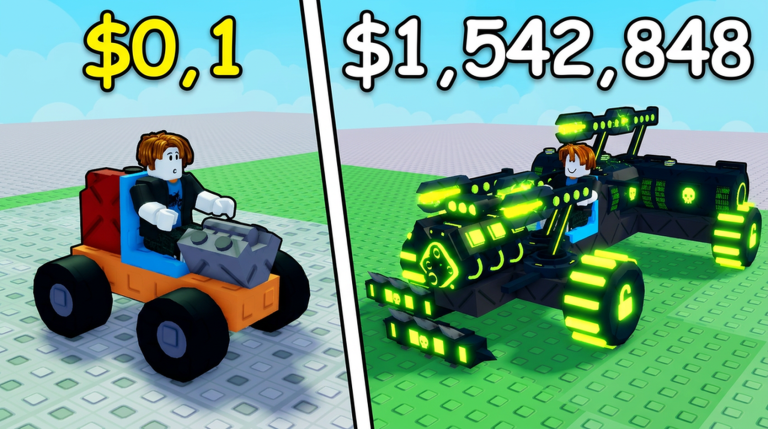
Build and Kill Zombies is a Roblox sandbox simulation where you bolt engines, fuel, weapons, and armor onto a car, then drive it through waves of zombies to see how far it can go. Cash you earn from distance and kills goes back into new parts and permanent skill upgrades, keeping a build-drive-upgrade loop going. This guide covers building your first car, reading the run screen, and spending your cash wisely.
In shortThe white arrows and on-screen prompts are the fastest way to understand how the game works, so follow them in order before exploring on your own.
When you first load in, white arrows and a prompt in the center of the screen point to each thing you need to touch next. Work through these in order rather than wandering the lobby first. One important detail: seeing a part appear in a roll result does not mean you own it. You still have to pay the listed price, and you should check that your inventory count has gone up before moving on.
Follow the arrowswork through the white arrow prompts in order without skipping ahead.
Get an enginevisit the vehicle parts roll area and buy a small engine when the tutorial directs you.
Place the engineopen build mode, go to the vehicle tab, and set the engine on the highlighted slot.
Get a weaponvisit the support roll area and pick up the shredder the tutorial specifies.
Place the weaponchoose it from the weapon tab and attach it to the marked spot at the front of your car.
Start your runpress the run button to head out on the first course.
In shortEngine and fuel must be balanced together, because a fast engine with too little fuel stops early just as surely as a slow engine with plenty.
Parts split into two broad groups: vehicle parts, which form the car itself, and supports, which are your weapons and extra equipment. Within vehicle parts, engine and fuel have a direct relationship — push one without the other and your run distance suffers. Blocks expand the car's frame and give you more attachment spots, while wheels handle stability and turning.
Blocks
expand your frame and create extra attachment points for other parts.
Engine
controls how much power and speed your car has.
Wheels
handle how stable and steerable the car is during a run.
Fuel
determines how long the car can keep moving; hitting zero ends the run.
Supports
the collective name for weapons and extra gear that attack zombies.
03Live and upcoming eventsEvents
いま開催中・開催予定のイベントです。期間が決まっているので先に確認しておきましょう。
Live nowOct 3 – Oct 10
⚡???⚡
The strongest have only just begun... True mastery awaits.
In shortStart with the default frame, add the four essentials, then put an attack support at the front — that is all you need to complete early runs cleanly.
There is no reason to build something large and complicated from the start. Use the default frame and focus on having an engine, fuel, wheels, and a driver seat in place, then attach one attack support pointing forward at the front of the car. Keeping the left and right sides roughly even makes the car easier to control. On PC, B opens build mode, F starts the run, R rotates a selected part, and Q deletes the selected part, but the on-screen prompts update to match each situation so check those too.
Tips worth knowing
Use the default frame rather than rebuilding from scratch.
Point your weapon forward so it actually hits what is in front of you.
Match the left and right sides of the car to keep it from pulling sideways.
Change only one part type per run so you can tell what made the difference.
Compare run distance before and after each change to measure whether it helped.
05
Reading the run screen
Check
In shortWatching whether fuel or vehicle condition drops first tells you exactly which part category to fix next.
During a run you can see distance traveled, cash earned, speed, vehicle condition, and fuel all on screen at once. Instead of focusing only on the zombies, keep an eye on whether fuel or vehicle condition is dropping faster. When the run ends, use the back button on the results screen to return to the lobby and confirm your cash has been added before you leave the server.
Fuel hits zero firstput your next cash into the fuel category.
Vehicle condition hits zero firstreview your weapon aim, support strength, and frame layout.
Distance is not growingswap out your engine and compare the next run's result.
Results screen before exitconfirm your cash balance has updated before leaving the server.
06
Earning and spending cash efficiently
Tips
In shortKeeping the car alive for a longer run beats chasing every zombie, especially in the early game when your build is still fragile.
Cash comes from two sources: distance traveled and zombies defeated. In the early game, a steady run that covers more ground brings in more cash than zigzagging to hunt every zombie, because weaving also makes it harder for a forward-facing weapon to connect. When it is time to spend, fix your current weakest point first rather than buying a rare part just because it looks impressive.
Tips worth knowing
Prioritize run length over kill count when your car is still basic.
Hold a straight line so your front-mounted supports can hit cleanly.
Spend on whichever part category is letting your car down right now.
Use the blueprint view as a shopping list to target the parts you actually need next.
Avoid draining all your cash on high-rarity parts before your core weaknesses are fixed.
In shortLuck-type skills improve every roll you make, so raising them early makes collecting all other part types much easier.
Skills are permanent upgrades that carry over between runs. Luck-type skills raise the odds of getting better parts from rolls across all categories, which is why they pay off earlier than almost anything else. Once your supports fill their slots and you need more room, move into the skill line that raises the support limit. Hold off on expensive special-roll skills until your standard rolls are already giving you solid results. Before buying anything, read the effect and unlock conditions on the skill screen, since values can change with updates.
Buy Luck skills firstthey improve roll outcomes across every part category at once.
Move to support-limit skillsdo this only once your support slots are actually full.
Hold off on high-cost special-roll skillswait until ordinary rolls are already stable.
Read the skill screen before buyingcheck the effect and any unlock conditions each time.
09
Mistakes that stall early progress
Warn
In shortMost early roadblocks come from either forgetting to confirm a purchase after rolling or upgrading only one part while ignoring its paired weakness.
The single most common mistake is assuming a roll result means you own the part. You still have to complete the purchase and watch your inventory count increase. The second most common problem is lopsided upgrading — piling everything into the engine while ignoring fuel, or adding more weapons while the existing ones face the wrong direction. Make small, targeted changes and verify the result in the next run.
Worth watching out for
Always confirm the purchase after a roll and check that your inventory count went up.
Never upgrade engine or fuel alonetreat them as a pair.
Mount weapons facing forward, not sideways or backward.
Do not spend all your cash on rare parts while a basic weakness is still unfixed.
Change only one or two things at a time, not the entire build at once.
Stay through the results screen so your earned cash is saved before you exit.
Glossary
Glossary
Cash
The in-game currency earned from run distance and zombie kills, used to buy parts and skills.
Vehicle parts
The collective name for blocks, engines, wheels, and fuel — everything that forms the car itself.
Supports
Weapons and extra equipment attached to the car, obtained from the support roll area.
Luck
A stat that raises the chance of getting rarer parts from rolls, upgradable through skills.
Vehicle condition
A value showing how much damage the car can still take before the run ends.
Fuel
The resource that keeps the car moving; when it reaches zero the run stops.
Blueprint
A reference showing which parts a complete build needs, useful for planning purchases.
Skill
A permanent upgrade to things like Luck or support capacity that persists across runs.
Roll
Spending cash to randomly draw a part from a chosen category.
Common questions
FAQ
How many players can join one server?
Up to five players can be in a single server. The tutorial and regular runs work fine on your own, so you do not need a full group to make progress.
Why is a part I rolled not showing up in build mode?
Rolling and owning are two separate steps. After the result appears you still need to pay the listed price to complete the purchase. Check that your inventory count has actually gone up before you leave the roll screen.
Is it a waste if I roll a part I already have?
Not necessarily. Expanding your frame or completing a blueprint can require multiples of the same block or wheel type. Check your inventory and your current build needs before deciding whether a duplicate is useful.
Can I play on a phone or tablet?
Yes. Building and running work through the on-screen buttons the game shows on your device. The PC key descriptions in this guide do not apply on mobile, so follow the prompts your device displays instead.
Updated Sep 15, 2026
Game updates can change what is on this page. If you spot something, get in touch and let us know.

 CYBERHACK
