
Flex UGC Codes Guide: How to redeem a code
About
OverviewFlex UGC Codes, developed by Rolimon's and CrimsonHeart, is a Roblox experience where you enter codes shared by creators to claim or purchase UGC avatar items. There is no combat or progression — the whole point is redeeming codes for hats, clothes, and accessories.
What is on this page
Contents
How to redeem a code
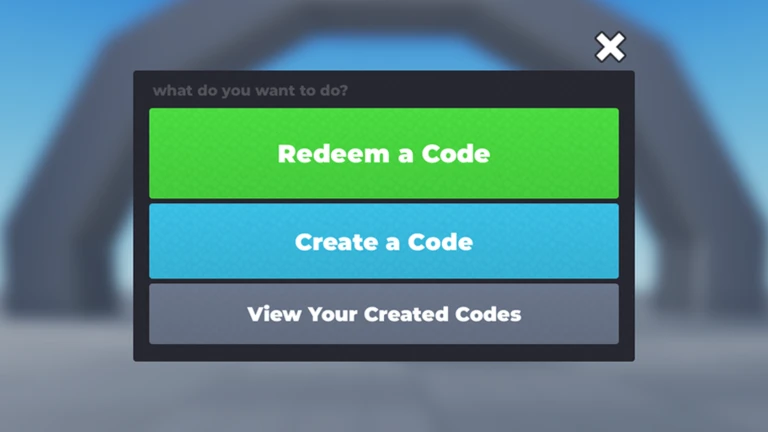
StepWhen you open the game a menu appears straight away. The only button you need as a player is 'Redeem a Code' — the other options, 'Create a Code' and 'Creator Tools', are for UGC creators. On a phone or tablet, copy and paste the code rather than typing it by hand; that removes most entry errors before they happen.
- Open the menu press 'Redeem a Code' when the game loads.
- Enter the code paste it exactly as the creator shared it, including any capital letters, numbers, and symbols.
- Read the requirements if any conditions appear, complete all of them before going further.
- Check the price the next screen shows the item name and any Robux cost; zero means free, any other number means Robux will be spent.
- Confirm only press the final button when you are happy with the item and price.
- Check your inventory open your Roblox inventory or avatar editor to confirm the item arrived.
 D198
White Blouse
6009
Neon White Cyber Light Saber
7007
Black Horns
Iriska1337
Rainbow Bridge Iriska Cat Pillow
D198
White Blouse
6009
Neon White Cyber Light Saber
7007
Black Horns
Iriska1337
Rainbow Bridge Iriska Cat Pillow
Three things to check before you type anything
CheckFinding a code is only the first step.
- The code itself copy it character for character, including capitalisation, digits, special characters, and no leading or trailing spaces.
- The target item check the name and image so you know exactly what you are getting.
- Conditions and price look up whether the code requires a group join, item ownership, a game pass, a badge, or anything else, and whether any Robux is involved.
Types of requirements a code can carry
Summary
Creators can attach up to ten requirements to any code. If you complete a group join or a follow and the game still does not accept it, close the redemption screen and reopen it; if that does not help, leave the game entirely and rejoin.
- Item ownership you must already own a specific avatar item.
- Group membership you must have joined a specified Roblox group.
- Game pass ownership you must own a particular game pass.
- Badge ownership you must have earned a specific badge.
- Timed code the code only works inside a set time window.
- Other conditions account age, Roblox Premium, a Robux transfer, being friends with or following a specific user can all be added by the creator.
What to do when a redemption fails
Step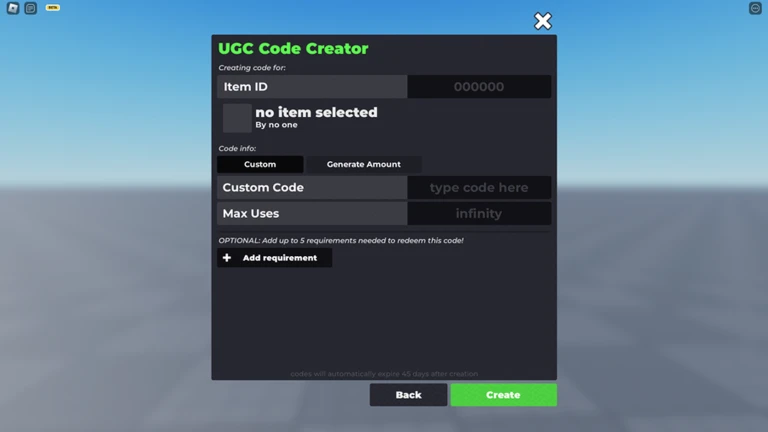
If an older video tells you to buy a game pass on the spot and nothing happens, find the creator's current instructions and purchase the pass on its original page instead.
- Check for a typo re-paste the code and make sure there are no extra spaces at either end.
- Confirm the source make sure the item and the code actually come from the same creator.
- Review every requirement go through each listed condition and confirm you have met all of them, not just some.
- Check expiry and stock some codes have a deadline or a limited number of uses; when either runs out the code stops working.
- Check if you already claimed it a code can only be redeemed once per account.
- Refresh the screen after completing a condition, close the redemption screen and reopen it, or leave and rejoin the game.
Staying safe while redeeming
Warn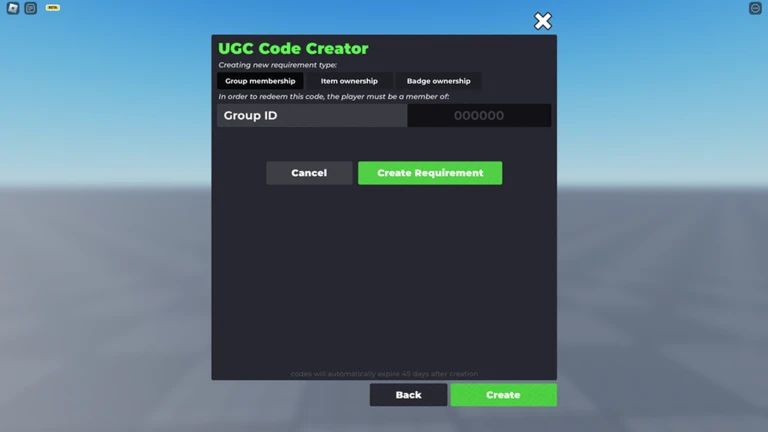
The game itself is straightforward, but codes circulate on social media where misleading posts sometimes appear alongside them.
Creating and distributing codes
Step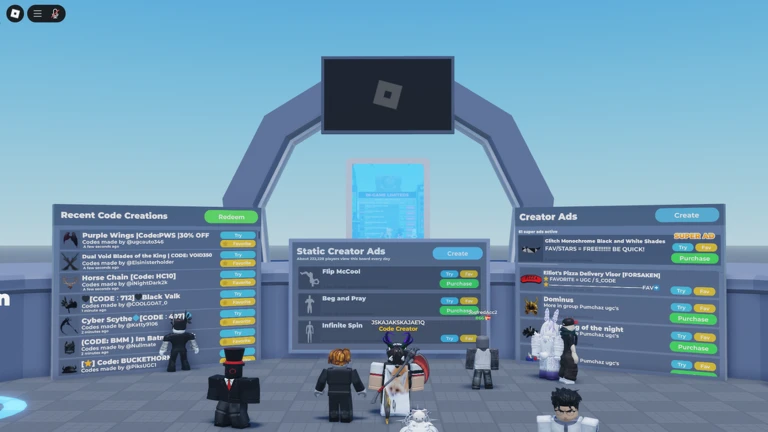
This section is for UGC creators who want to run their own code drops.
- Change the sale location set your UGC item's sale location to experience-only.
- Whitelist the place add this game's place ID to the whitelist so the item can be sold here.
- Generate codes create one code at a time or generate a batch of up to one hundred.
- Set requirements attach up to ten conditions (group join, item ownership, Robux transfer, and so on) to each code.
- Share freely distribute codes through social media, Discord, or any other channel you choose.
Glossary
Glossary- UGC
- User Generated Content — avatar items such as hats, clothes, and accessories made by Roblox creators.
- Redeem
- The act of entering a code to claim an item or open its purchase screen.
- Experience-only
- A sale-location setting that restricts an item so it can only be sold or distributed inside specific Roblox experiences.
- Whitelist
- A list of place IDs that a creator registers to allow code redemption for their items.
- Badge
- A permanent record on your Roblox account showing that you completed a specific in-experience achievement.
- Robux
- The currency used inside Roblox to buy items and additional features.
- Roblox Premium
- A paid Roblox membership that gives monthly Robux and other perks.
Common questions
FAQI entered the code but nothing happened. What should I check?
The most common causes are a typo, an expired code, sold-out stock, or an unmet requirement. Paste the code again carefully and make sure there are no extra spaces, then check that every listed condition is fully completed. If conditions were just finished, close the redemption screen and reopen it before trying once more.
Where do I find the item after a successful redemption?
Open your Roblox inventory or the avatar editor and look for it there.
If I cancel the purchase confirmation, will I lose Robux?
Cancelling before you confirm the purchase does not charge you. If you want to be certain, check your Roblox transaction history to see whether any Robux moved.
My friend redeemed the same code successfully, but it is not working for me. What is different?
Requirements are checked per account, so you need to meet every condition on your own account regardless of what your friend has done. Go through the full list of requirements and confirm each one for yourself.
Game updates can change what is on this page. If you spot something, get in touch and let us know.
