Junk Mechanics is a car-flipping simulator on Roblox where you buy wrecked vehicles from a junkyard, repair and repaint them, then sell them for profit. This guide covers everything from your first flip to managing repairs, choosing where to sell, and avoiding common money mistakes.
In shortFinishing the tutorial and completing one full flip on a cheap car is the fastest way to learn the game.
When you first load in, work through the tutorial all the way to the end — skipping it makes it easy to lose track of which station handles which part. After the tutorial, walk around and locate the four key areas: the junkyard where you buy cars, the repair shop, the paint area, and the sell point. Your first goal is not to buy an expensive car; it is to take one cheap car all the way from purchase to sale without stopping halfway.
Complete the tutorialfollow every step covering inspection, repair, paint, and sale so the full loop sticks
Find each areawalk to the junkyard, repair shop, paint area, and sell point before buying anything
Pick an affordable carchoose one cheap enough that you still have cash left for repairs after buying it
Work through the repair log one part at a timeremove one piece, fix it, reinstall it, then move to the next
Finish all mechanical repairs before paintingkeeping this order makes it easier to track what you have spent
Check the estimated payout before sellingconfirm you are making a profit, then hand the car over
In shortAlways open the repair log first and handle one part at a time so nothing gets missed.
When you bring a car to the repair shop, the repair log tells you exactly which parts need attention and in what state they are. Do not judge a part by how dirty it looks — follow what the log actually lists. Different parts need different tools and stations: a dirty radiator gets cleaned with a sponge at the wash station, a weak battery may recover on the charger before you consider replacing it, and tyres and wheels go through a dedicated disassembly station. Engines and transmissions can require grinding or welding at separate equipment depending on what the log specifies.
Open the repair log before touching anythingit tells you which parts need work and which station to use
Try the wash station on dirty parts before spending money on replacements
Test the battery on the charger before buying a new one
Take tyres and wheels to the dedicated station, swap only the parts that actually need replacing
Use the station the log points you to for engine and transmission workgrinding or welding may be required
After each part is reinstalled, check that the log updates and the car's overall condition improves
03Live and upcoming eventsEvents
Events running now or coming soon. They have fixed dates, so check them first.
In shortSmall consistent profits on cheap cars grow your funds more reliably than chasing one big flip.
The most stable way to grow your money is to repeat the same loop — buy cheap, repair, paint, sell at a profit — rather than gambling on a single expensive vehicle. After each sale, always keep enough cash on hand to cover the next car's purchase and its repairs before you spend anything else. If a flip comes out at a loss, look at the individual costs rather than blaming the car model.
Tips worth knowing
Calculate net profit as sale price minus purchase cost, repair costs, replacement parts, and paint before you commit to a car
Never spend your entire sale payout on the next car — keep a repair budget in reserve
05
Painting and choosing where to sell
Step
In shortCompleting all mechanical repairs before painting, then comparing sell points, is how you get the most out of each flip.
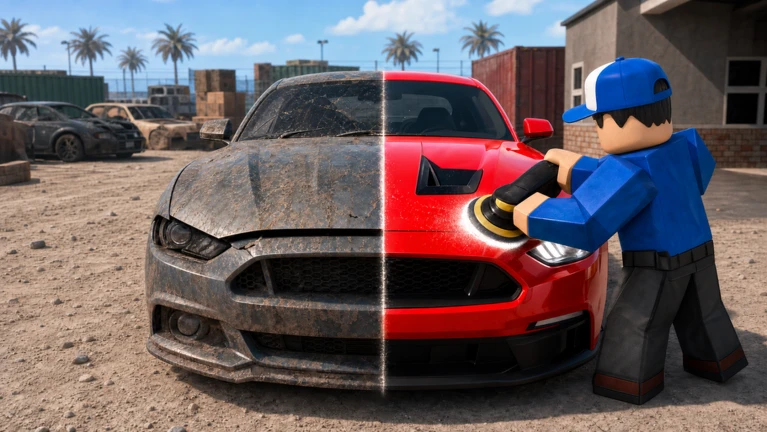
Paint raises the sale value of a car, but it is a finishing step — not a first one. Running through mechanical repairs first keeps your spending clear and prevents you from painting a car you might still need to pull apart. Once everything is fixed and painted, you have more than one place to sell, and the difference in offers can matter.
Finish all mechanical repairscomplete every item in the repair log before you go near the paint area
Replace tyres if neededdo this before painting so the car is fully ready in one pass
Paint the carthen check the condition reading to see where it has landed
Get an estimate before committingnote the figure the buyer offers
Try a premium dealership for higher-tier carsthe offer there can beat the standard buyout
Compare instant buyout against the standard estimatethe quick option tends to pay less
06
When progress feels stuck
Check
In shortBefore spending money on new parts, check for installation errors and unfinished repair log items.
If the repair log stops updating after you work on a part, the most common reasons are that the part was not returned to the car, it was placed in the wrong position, or a different tool or station is still needed. A car that will not move is usually missing something that was removed — the log shows every item that should be on the vehicle, so run through it completely rather than guessing.
Recheck the repair log for any items still marked incomplete before buying replacement parts
Confirm each repaired part was reinstalled in the correct slotthe wrong position does not count as done
Look up the part name in the log if an action will not starta different station may be required
Account for every removed partbattery, intake and exhaust components, and tyres all need to be back on the car
If your inventory feels full, clear out items you no longer need to free up carrying space
07
Things to save for later
Warn
In shortProtect your early funds by leaving garage upgrades, tuning, and auctions until your flipping income is steady.
Spending on a bigger garage before you actually run out of storage, or tuning a car you plan to sell, eats into the cash you need to keep flipping. Auctions involve a random result, so going in while your funds are tight can stall your progress entirely if a cheap car comes out. Any item that costs Robux is a real purchase, so talk to a parent or guardian before spending.
Worth watching out for
Hold off on garage expansion until your current storage genuinely cannot fit your cars
Skip tuning on cars you intend to sellrecovering a high upgrade cost from the sale price is difficult
Only enter auctions with money you can afford to losenever use funds earmarked for repairs
Instant buyout is convenient but tends to pay less than a standard estimatecompare first
Check with a parent or guardian before spending Robux, especially on anything with a random outcome
08
Redeem codes
Step
In shortEnter codes in the in-game field as soon as you find them, because they expire and each one works only once.
The developers release bonus codes tied to milestones such as update launches or like counts on the game page. There is a code entry field inside the game's menu or UI. Each code can only be redeemed once per account, and codes do expire, so enter one as soon as you have it.
Open the in-game menufind the code entry field in the UI
Type the code exactlycapitalisation and spelling must be correct or it will not register
Confirm the rewardthe game should notify you that the code was accepted
Move onthe same code cannot be redeemed a second time on the same account
The area where damaged cars are displayed for sale — your starting point for every flip.
Repair log
The in-game checklist that tells you which parts on your current car need inspection or repair and which station to use.
Condition
A percentage rating showing how good a car or part's state is; a higher reading generally leads to a better sale estimate.
Tier
The category that groups cars by price and value — higher tiers need more money to buy, repair, and paint.
Net profit
What you actually earn from a flip: sale price minus purchase cost, repair costs, replacement parts, and paint.
Estimate
The offer a buyer or dealership gives you before you commit to selling a car.
Garage
The space where you store cars between jobs; larger garages hold more vehicles at once.
Tuning
Performance modifications such as a turbo that change how a car drives — mainly a mid-to-late game feature.
Auction
An alternative buying and selling area where the car on offer is determined randomly.
Instant buyout
A quick sell option near the auction that is convenient but tends to offer less than a standard estimate.
Common questions
FAQ
How do I earn money when I can barely afford my first car?
Pick the cheapest car available and make sure buying it still leaves you cash for repairs. Keep every payout cycle going by never spending your full balance on the next purchase.
Why won't a repaired part go back onto the car?
First check that the repair itself is fully complete — the log will still show the item as open if any step is unfinished. If it still won't attach, open the log to check whether a separate task needs finishing before that slot accepts the part.
Is it worth buying a car from the auction early on?
The auction result is random, so there is a real chance of winning a car whose repair costs eat through your budget and stall your progress. It is safer to wait until you have funds well beyond what you need for a standard flip. Use the auction only with money you could afford to lose entirely.
Can I play this on a phone?
Yes — the game officially supports mobile play alongside desktop and console.
Do I need to spend Robux to finish the game?
Buying cars, repairing them, painting them, and selling them all run entirely on in-game cash. Some features like storage expansions may involve Robux, but none of that is required to progress.
Updated Sep 6, 2026
Game updates can change what is on this page. If you spot something, get in touch and let us know.
 Live now
–
Live now
–

 NOBUGS
